
What you can do
- Send email campaigns from your own sender with open, click and unsubscribe tracking.
- Send WhatsApp template messages with an image header through the WhatsApp Business API.
- Plan and approve social media posts for Facebook, Instagram and LinkedIn.
- Keep reusable messages and media in the Content Store, rotated in sequence or at random.
- Keep contacts in Address Books, validate them, and share books with other organisations.
- Run now or on a schedule, and read a performance report with AI insights.
How to get started
- Open Mavrix and add contacts to an Address Book.
- Write your messages in the Content Store.
- Create an email, WhatsApp or social media campaign and choose its Address Books and content.
- Run it, or schedule it, then review the report.
Built for consent and reliability
Unsubscribes, WhatsApp STOP replies, bounces and denied contacts are suppressed from every future send. Large lists are split into batches so a campaign of thousands finishes without timing out, and you can watch progress while it runs. Message only people who have agreed to hear from you.
Pairs with enquiry management and quality checks
Customers who reply to a campaign can be handled by the ERA enquiry management system, and Intelligent Quality Assurance can test the landing pages and links your campaigns point to, so a broken page never wastes a send.
- Email, WhatsApp and social: Run all three kinds of customer campaign from one workspace.
- Content Store and Address Books: Reusable messages and validated contacts shared across campaigns.
- Tracking and insights: Opens, clicks, deliveries, reads and replies, with AI insights per campaign.
What campaign management gives your team
Email campaigns with real tracking
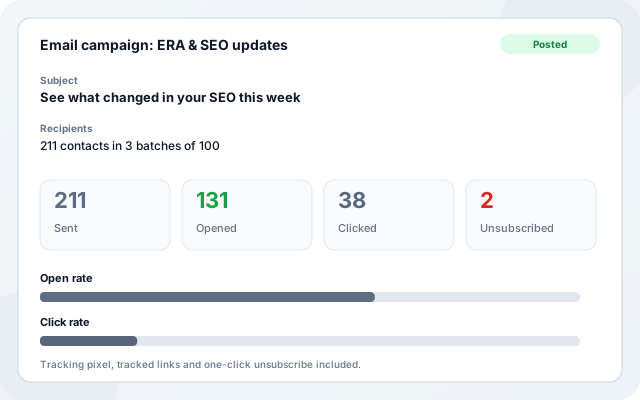
Send email campaigns from your own sender with an open pixel, tracked links and one-click unsubscribe, so you see what each campaign achieved and honour opt-outs automatically.
- Pick the next message or a random one from your Content Store.
- Large lists are split into batches of 100 and sent in parallel.
- Open rate, click rate, bounces and unsubscribes in the campaign report.
- Hard bounces and unsubscribes are suppressed from every future send.
WhatsApp campaigns with approved templates
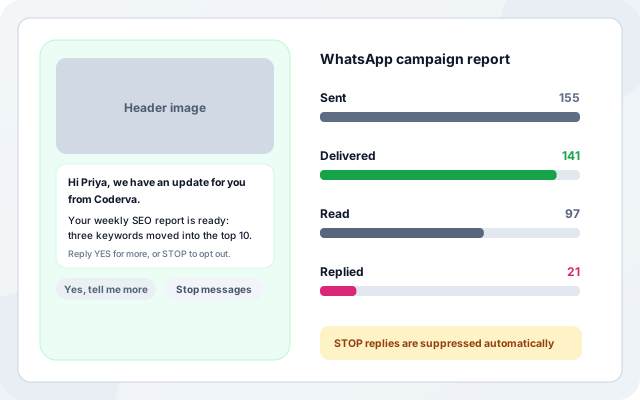
Send WhatsApp template messages to opted-in contacts through the WhatsApp Business API. Reuse your existing WhatsApp number, add an image header, and follow every message from sent to read.
- Use a Meta-approved marketing template with an image header and quick reply buttons.
- Sent, delivered, read and replied counts update from WhatsApp status webhooks.
- STOP replies and numbers that are not on WhatsApp are suppressed automatically.
- Chat with customers who reply, from the same workspace.
Social media campaigns with approval
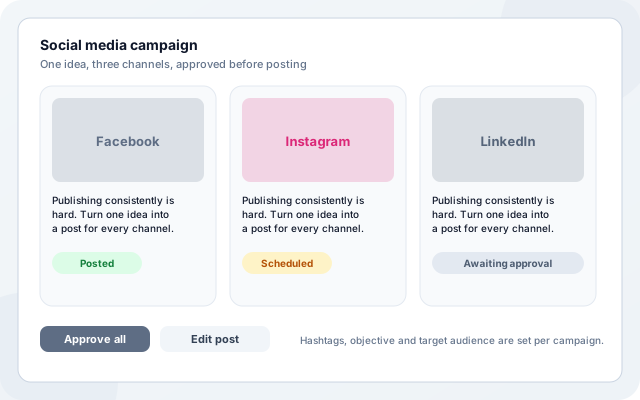
Turn one idea into posts for Facebook, Instagram and LinkedIn. AI drafts the content from your objective and audience, and nothing is published until you approve it.
- AI-assisted posts with objective, hashtags and target audience.
- Review and approve before posting, or schedule ahead.
- Performance insights for each campaign after it runs.
- Connect and manage your social accounts once.
Content Store and Address Books
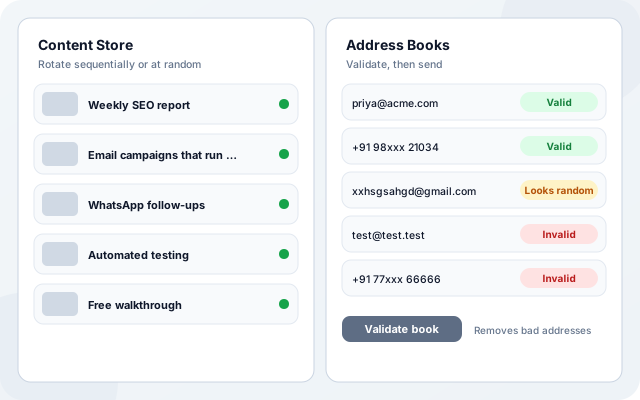
Keep the content you send and the people you send it to in two reusable books. Validate contacts before a campaign so you protect sender reputation and avoid wasted sends.
- Content Store: messages, images and videos, rotated in sequence or at random, with AI help to write them.
- Address Books: import from CSV or Excel, with email and phone numbers per contact.
- Validation checks syntax, domains and mail servers, and phone number formats, and flags addresses that look random.
- Share books with other organisations, and keep a denied list that is never contacted.
From idea to measured campaign
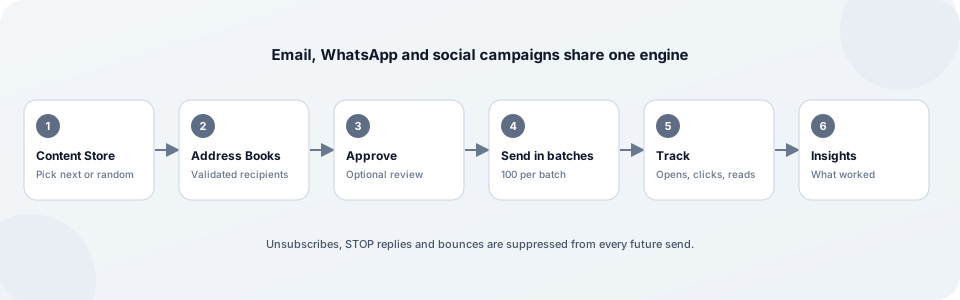
The same steps work for email, WhatsApp and social campaigns.
- Build your books: Add contacts to Address Books and write messages in the Content Store.
- Validate your contacts: Run validation to remove invalid emails and phone numbers before you send.
- Choose a channel: Create an email, WhatsApp or social media campaign and pick its books.
- Run or schedule: Send now or on a schedule, with optional approval, in batches that keep large lists reliable.
- Measure and improve: Read the report and AI insights, then adjust your next campaign.
One engine behind every campaign
What teams run first
Each campaign type can run on its own. Pick the channel where your customers respond.
- Newsletters and product updates: Send regular updates to customers and prospects and see who read them.
- WhatsApp offers and reminders: Reach opted-in customers on the channel they open first.
- Lead nurturing sequences: Rotate a series of messages from a Content Store to keep leads warm.
- Event and webinar invitations: Invite lists by email and WhatsApp and track responses.
- Social media calendar: Draft, approve and schedule posts for several networks together.
- List clean-up before a big send: Validate Address Books to protect deliverability before you launch.
Channels and sources
Campaigns connect to the accounts you already use.
- Email via your own SMTP sender
- WhatsApp Business API (Meta Cloud API)
- Facebook and Instagram
- CSV and Excel contact import
- Gmail contacts sync
- Open, click and unsubscribe tracking
- WhatsApp delivery and read webhooks
- Intelligent QA checks for landing pages and links
Consent and control built in
Campaigns work for you without sending to people who should not hear from you.
- Opt-out is honoured: Unsubscribes, WhatsApp STOP replies and denied-list contacts are suppressed from every future campaign.
- Approval when you want it: Review AI-written content before email and social campaigns go out.
- Validation protects your sender: Remove invalid, disposable and likely-random addresses before they hurt your sender reputation.
- Reliable large sends: Big lists are split into batches, each batch is claimed once, and progress is visible while a campaign runs.
What is in campaign management
- Email campaigns: Your own sender, tracked opens and clicks, and one-click unsubscribe.
- WhatsApp campaigns: Approved templates with image headers and delivery and read tracking.
- Social media campaigns: AI-assisted posts for Facebook, Instagram and LinkedIn with approval.
- Content Store: Reusable messages and media, rotated in sequence or at random.
- Address Books: Contacts with email and phone, import, sharing and validation.
- Scheduling: Run now or on a schedule for each campaign.
- Performance reports: Opens, clicks, deliveries, reads, replies and AI insights.
- WhatsApp chat: Reply to customers who answer a campaign without leaving the workspace.
Frequently asked questions
Which channels are supported?
Email through your own SMTP sender, WhatsApp through the WhatsApp Business API with approved templates, and social media posts for Facebook, Instagram and LinkedIn.
Do I need an approved WhatsApp template?
Yes. WhatsApp requires an approved marketing template for business-initiated messages. You enter its name and language in the campaign and the content fills its variables.
Can I clean my contact list before sending?
Yes. Validation checks email syntax, domains and mail servers and phone number formats, flags addresses that look random, and can remove invalid entries.
How are unsubscribes handled?
Emails include a one-click unsubscribe, and WhatsApp STOP replies are detected. Those contacts are suppressed from all later campaigns.
Also known as
Mavrix Campaign Management also covers what people search for as:
- Customer Campaign Management
- Campaign Management Software
- Marketing Automation Platform
- Email Marketing Automation
- WhatsApp Marketing Automation
- Social Media Campaign Management
- Omnichannel Campaign Management
- Customer Engagement Platform
- Customer Outreach Software
- Customer Communication Management
- Marketing Campaign Orchestration