Use cases
- Draft quotation emails with a consistent structure and tone.
- Answer common prospect questions using the knowledge you attach to the agent.
- Read destination, dates and traveller counts from an enquiry and price them from your package rules.
- Look up or create a record in your own CRM through the ERA CRM tools.
- Prompt follow-ups so warm prospects are not left waiting.
Apps and templates that apply
- ERA Smart Quotation: extraction and pricing built around travel-style packages, with drafts for review.
- Sales assistant agent: a template listed for prospect communication and follow-up.
- Agent Builder: to tailor prompts and tool choices to your offer.
- ERA follow-up monitor: reminders when a customer has not replied.
How it works
- Enable the ERA email routing template and turn on Smart Quotation in its setup.
- Enter your packages, rates and pricing rules, and your tone and policies as instructions.
- Optionally add a sales assistant agent from the Agent Studio templates tab.
- Test with realistic enquiries and refine until the drafts match your standards.
- Review each draft before it is sent while you tune the setup.
Who it is for
This domain suits small and mid-sized sales teams, agencies and service businesses that send many similar quotations. The agent prepares and organizes the work, while your salespeople decide pricing, discounts and commitments. Review drafts in the early weeks, and keep human approval for anything contractual. Over time, refine the agent with the questions prospects ask most often, so that its drafts reflect how your business really talks about its offer.
- Approve before sending: Quotes can wait for your team, or auto-send above a confidence threshold you set.
- Your pricing rules: Markup, tax, packages and rate cards are yours. Prices are computed by rules.
- Follow-up on quiet quotes: Remind the customer, then escalate to your team.
What a sales team gets
Quotes drafted from the enquiry
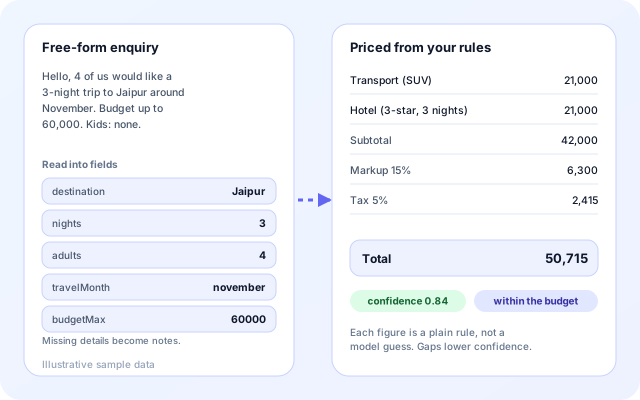
Smart Quotation is part of ERA and is off until you enable it. It reads the request from a free-form email, then prices a reply with a rule engine. It is built around package-style quotes: destination, nights, travellers, month and budget.
- An LLM reads the email, and a pattern-based reader takes over if the model call fails.
- Missing details become notes and lower the confidence score.
- Markup is applied to the subtotal, then tax, and the total is shown line by line.
- Below the threshold you set, the enquiry goes to a person instead of an automatic reply.
Two ways to price
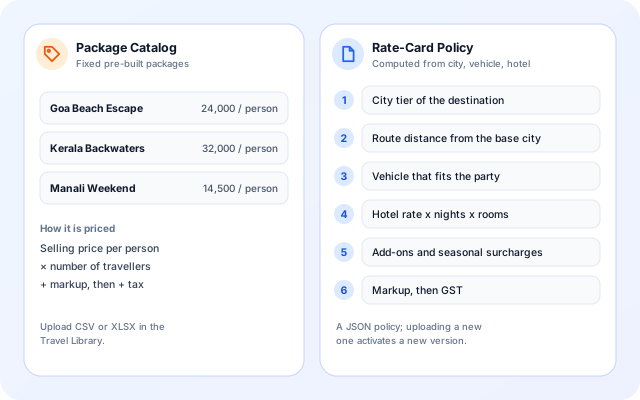
Pick a pricing source per workflow. The Package Catalog suits fixed offers. The Rate-Card Policy suits quotes that depend on distance, vehicle and hotel rates.
- Package Catalog: selling price per person times travellers, plus markup and tax.
- Rate-Card Policy: city tier, route distance, vehicle, hotel rate times nights and rooms, add-ons and surcharges.
- Seasonal surcharges apply by month, as a percent or a fixed amount.
- Uploading a new policy activates a new version.
Approve before it goes out
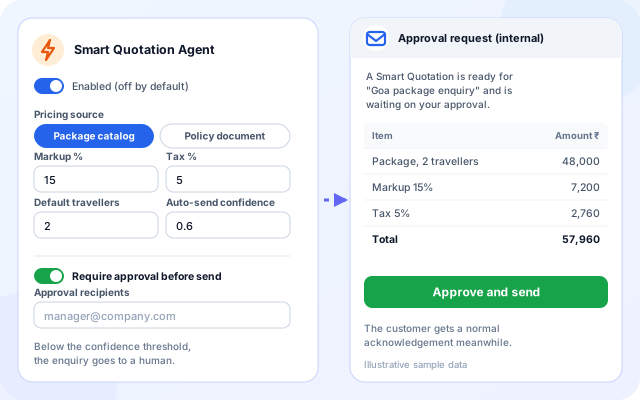
Turn on Send Through Email Approval and the customer gets the normal acknowledgement while the priced quote goes to your team first. Approving sends it to the customer in the same thread.
- Approval recipients are set per workflow.
- Without recipients, the default escalation address is used.
- Markup, tax, default travellers and the auto-send threshold sit next to each other.
- A published itinerary can be attached to the quote email.
A Sales Assistant agent for everything else
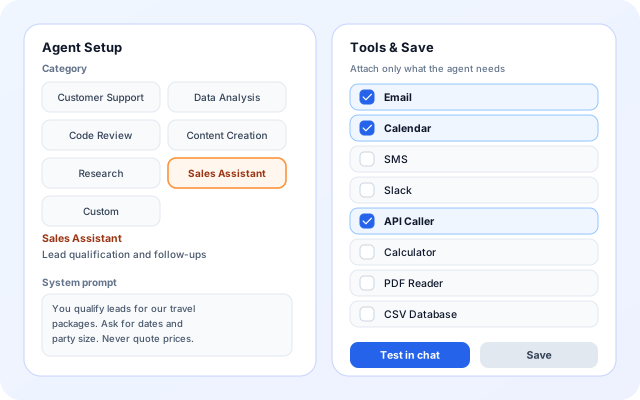
For conversations that are not quotes, build an agent in Agent Builder. Choose the Sales Assistant category, write the instructions and attach only the tools it needs.
- Tools such as Email, Calendar, SMS, Slack, API Caller, Calculator, PDF Reader and CSV Database.
- Test in chat and read the visible steps before you deploy.
- Deploy to a URL, or submit the agent as a template.
- The Templates page lists a Sales Assistant Agent for lead qualification, outreach drafting and quotation preparation.
From enquiry to a followed-up quote
The quotation path and the agent path can be used together or on their own.
- Receive: Connect the enquiry mailbox, and add WhatsApp numbers if prospects write there.
- Understand: ERA reads the request and fills in destination, nights, travellers, month and budget.
- Price: Your catalog or rate card is applied with markup and tax, and a confidence score is calculated.
- Approve: The quote goes to your team with Approve and send, or to a person when confidence is low.
- Follow up: The follow-up monitor reminds the customer and escalates to your team if nobody replies.
A quote path and an agent path
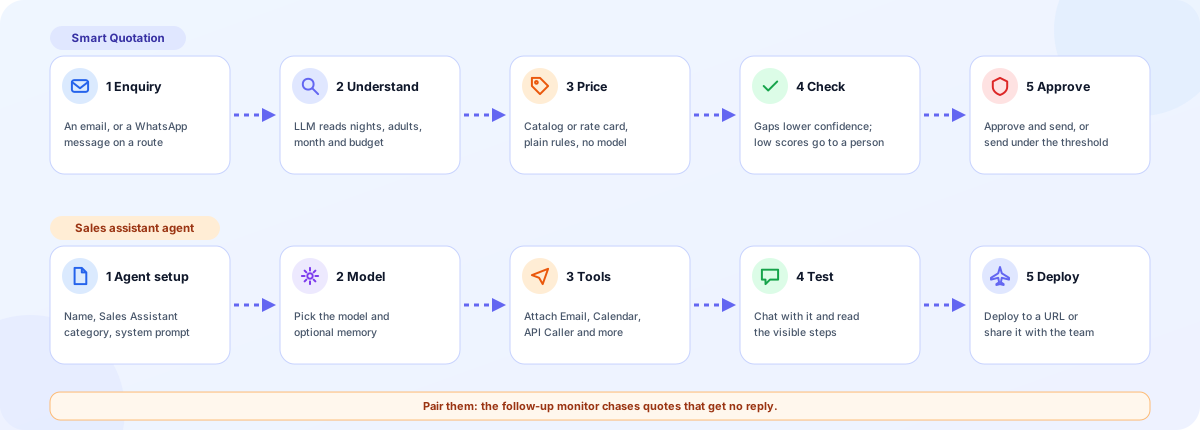
Building blocks for sales and quoting
Apps, templates and agents that work together. Each one is optional.
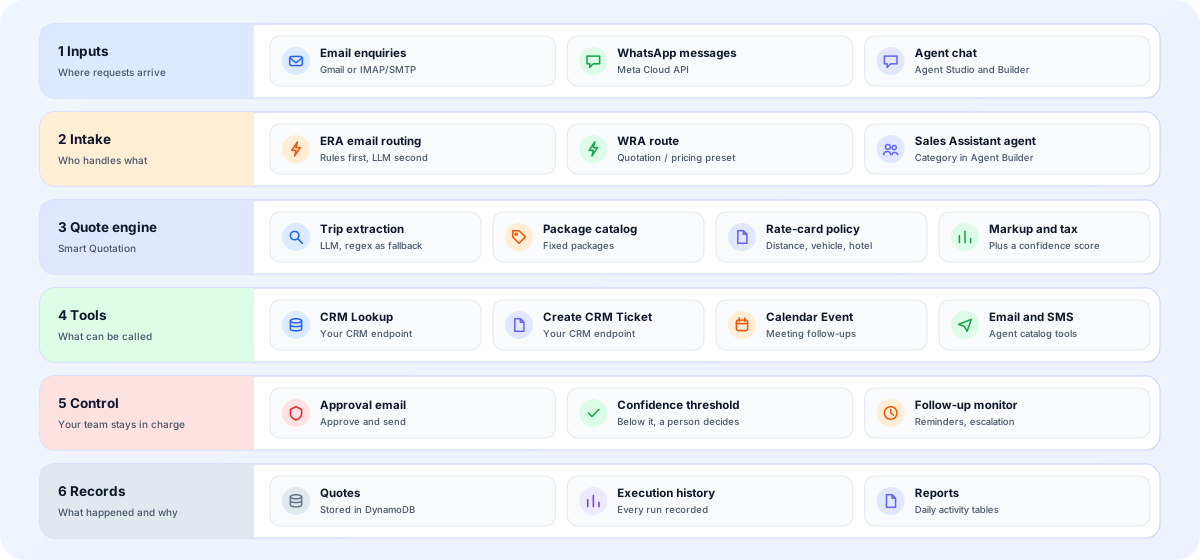
- Inputs: Email from Gmail or IMAP, WhatsApp through the Meta Cloud API, and chat with agents built in Agent Studio.
- Intake: ERA routes email, WRA routes WhatsApp with a Quotation / pricing preset, and a Sales Assistant agent handles conversations.
- Quote engine: Trip extraction, a package catalog or a rate-card policy, then markup, tax and a confidence score.
- Tools: CRM Lookup and Create CRM Ticket call your CRM endpoint. Calendar Event, Email, SMS and API Caller cover the rest.
- Control: Approval email, a confidence threshold, a follow-up monitor and Escalate to Human keep your team in charge.
- Records: Quotes are stored in DynamoDB, and every run appears in Execution History and the daily reports.
Screens a sales team will use
Labels below are the ones shown in the product.
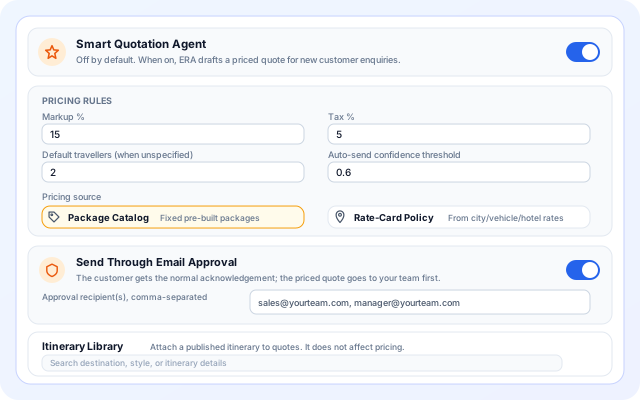
Smart Quotation settings
Switch it on, set the rules and decide who approves.
- Pricing Rules: Markup %, Tax %, Default travellers and Auto-send confidence threshold.
- Pricing source: Package Catalog or Rate-Card Policy.
- Send Through Email Approval with approval recipients, and an Itinerary Library to attach to quotes.
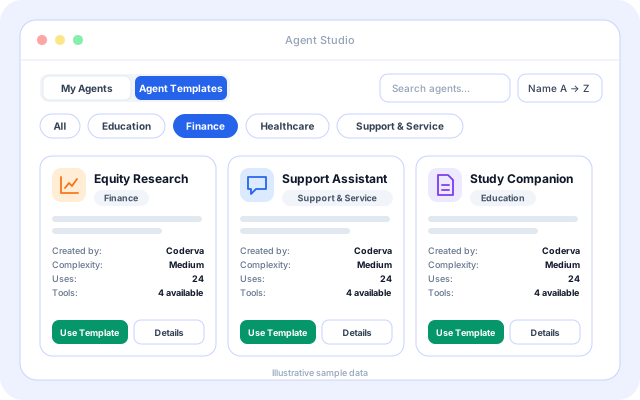
Agent templates
Start an agent from a template instead of a blank page.
- Search and sort the Agent Templates tab and filter by category.
- Sales and lead agents appear under the Support & Service group.
- Details shows the tools and use cases before you press Use Template.
Attach the tools it needs
Give the sales agent only the tools it should be able to call.
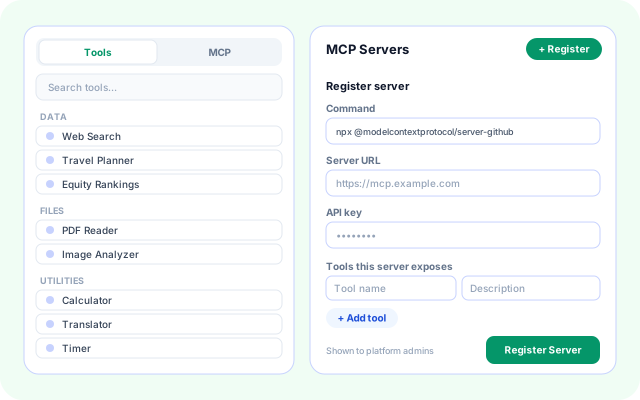
- A searchable tool list grouped by category.
- Per-tool settings for each tool you attach.
- MCP servers can be registered for tools outside the catalog.
Scenarios for a sales team
Each scenario uses building blocks that exist in the product today.
- Quote on first reply: Price a draft from the enquiry and send it, or hold it for approval, in the same thread.
- Package and rate-card quoting: Agencies and operators that sell packages or road trips can price from a catalog or a rate card.
- WhatsApp price questions: A Quotation / pricing route replies, asks for dates and quantity, and forwards the lead to your team.
- Lead qualification: A Sales Assistant agent asks for the details a salesperson needs, following your instructions.
- CRM records and tickets: CRM Lookup and Create CRM Ticket call your CRM API with a bearer token, API key or basic auth.
- Chasing quiet quotes: Remind the customer, then escalate to your team. Threads already accepted or rejected are left alone.
Systems named in the code
These are the channels and tools the sales building blocks use today.
- Gmail (App Password)
- Any IMAP and SMTP mailbox
- Meta WhatsApp Cloud API
- Your CRM through its API endpoint
- Calendar events
- Email and SMS tools
- Slack tool
- API Caller for REST APIs
- CSV and XLSX package import
Your team keeps the decisions
The agents prepare and route. People approve and decide.
- Approval before sending: With approval on, the priced quote goes to your recipients first and the customer receives only an acknowledgement.
- Confidence threshold: Below the threshold you set, the enquiry goes to a person instead of an automatic reply.
- Prices come from rules: Catalog and rate-card pricing are computed by rules, not by a model, and each gap in the enquiry is listed.
- Tools you choose: An agent can call only the tools you attach, with settings you control.
What is in the sales toolkit
- Enquiry understanding: Reads destination, nights, travellers, month and budget from free-form email.
- Two pricing sources: Package Catalog or Rate-Card Policy, with markup, tax and surcharges.
- Approval flow: Approve and send by email, with recipients and a confidence threshold.
- Sales Assistant agent: Build, test and deploy an agent with the tools you choose.
- CRM and calendar tools: CRM Lookup, Create CRM Ticket and Calendar Event in ERA.
- WhatsApp routes: WRA replies and forwards with presets such as Quotation / pricing.
- Follow-up monitor: Customer reminders and team escalation on an interval or cron schedule.
- Reports and history: Execution history and daily activity tables for every workflow.
Frequently asked questions
Will the agent set prices on its own?
Only within the guidance and knowledge you give it. Pricing, discounts and commitments should remain under your control, so review drafted quotations before they are sent, particularly while you tune the agent.
Which systems can the agent connect to?
Smart Quotation works through your connected mailbox, and ERA can look up or create a record in your own CRM through its CRM tools. Agents you build can also use the tools in the platform catalog.
Can I start without building from scratch?
Yes. Enable the ERA email routing template and its Smart Quotation setting, or start from a sales assistant template in Agent Studio, and test it before you rely on it.