Use cases
- Monitor a website on a schedule and review the issues and fixes the SEO workflow proposes.
- Track the history of SEO runs so you can see what changed and when.
- Get keyword, ad copy, landing page and budget recommendations from the Google Ads PMA agent.
- Draft and schedule campaign emails through the Marketing and Social agent.
- Combine search, ads and social work in one place instead of separate tools.
Apps and templates that apply
- SEO Management: a workflow template with a guided setup wizard.
- SEO Intelligence: the app for reviewing site findings, proposals and run history.
- Google Ads PMA: a performance marketing assistant template.
- Marketing and Social Agent: a template for drafting and posting content.
How it works
- Enable the SEO Management template and enter your website through the setup wizard.
- Run it with run-now to produce a first set of findings and proposals.
- Open SEO Intelligence to review proposals and decide which to apply.
- Add the Google Ads and Marketing and Social templates if those channels matter to you.
- Schedule recurring runs and review the history to measure how your site evolves.
Who it is for
This domain suits marketers, founders and agencies who want regular, structured attention on their website and channels without hiring for every task. Search engines and ad platforms make their own decisions, so no tool can promise rankings or specific results. Use the findings as input to your strategy and verify changes. Many teams start with SEO Management alone, build a habit of reviewing proposals each week, and add ads or social posting once that routine is working.
- Website health with evidence: Crawl results joined with Search Console and GA4 data, scored and ranked by severity.
- Paid search you review: PMA plans, audits and reports. Your marketer decides what to apply in Google Ads.
- Approval before it goes out: AI-written campaigns are emailed to an approver first. SEO changes wait for approval too.
What each building block does for your marketing
Audit the website the way a search engine sees it
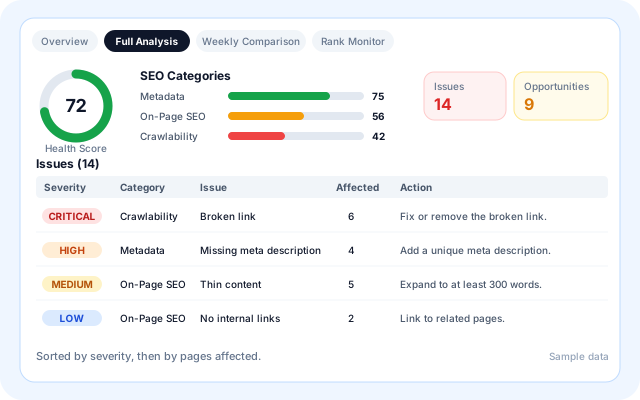
SEO Intelligence crawls the sitemap and links, checks every page and turns the results into a health score, categories and a severity-ranked issue list with a recommended action for each.
- Titles, meta descriptions, H1 headings, canonicals, noindex, alt text and thin content.
- Broken links, redirects, duplicate titles and duplicate content.
- Mobile PageSpeed checks for LCP, CLS and INP on the home page.
- Rank Monitor tracks seed keywords through Serper and lists what improved or declined.
Review SEO fixes before they publish
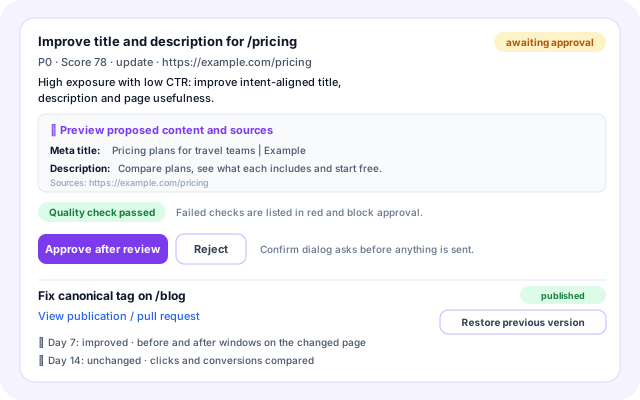
Opportunities are scored, then specialist agents draft the change: a title, description, page content, schema or a technical file edit. Each proposal shows its reason and passes a quality check before anyone can approve it.
- Priority P0 to P3 with the evidence behind it.
- Approve after review, Reject, Publish or Open PR, and Restore previous version.
- Publishing goes to a GitHub pull request that is never merged for you, or to WordPress.
- Impact checks at day 7, 14 and 30 compare the changed page before and after.
Plan and review Google Ads with specialist agents
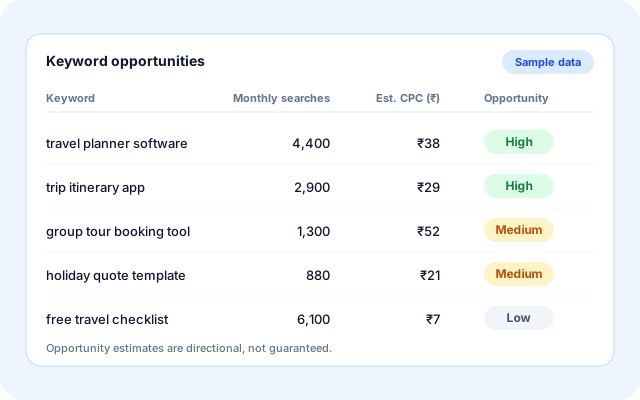
PMA is a team of nine agents. They research keywords, draft responsive search ads, audit landing pages, review budget pacing and wasted spend, plan A/B tests and write reports. The output is advice for your marketer to review.
- Seed and competitor keyword research with opportunity estimates.
- Responsive search ads with an ad strength score.
- Landing page audits for paid-search readiness and Quality Score ideas.
- Daily, weekly and monthly reports.
Send campaigns to the right audience
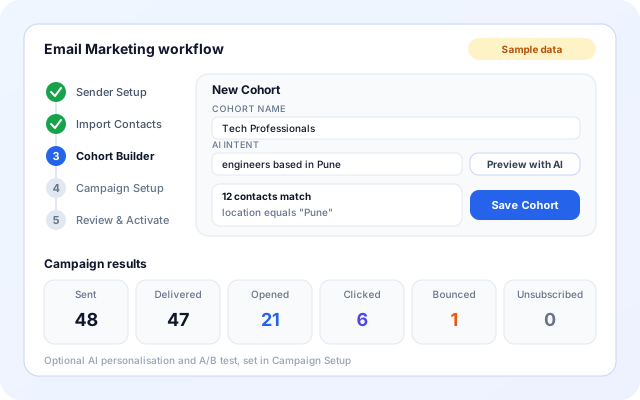
The Marketing & Social Agent writes a campaign email from your objective and sends it to your recipient list after approval. The Email Marketing workflow adds contacts, cohorts and campaign results for larger audiences.
- MSA: objective, hashtags and audience in, subject line, copy and image out.
- Recipients are sent in BCC batches with an unsubscribe line and headers.
- Email Marketing: CSV or Gmail contacts, AI-built cohorts, optional personalisation and A/B test.
- Campaign results: sent, delivered, opened, clicked, bounced and unsubscribed.
Start with the website, then add channels
Most teams begin with SEO and add paid search or campaigns once the weekly review habit is in place.
- Add your website: Enable SEO Management and fill in Project Setup: target domain, seed keywords, competitors, country and language.
- Connect your sources: Add Serper and PageSpeed keys, Google access for Search Console and GA4, and GitHub or WordPress if you want publishing.
- Review the first findings: Open SEO Intelligence to read the audit, rank movement and proposed changes, and approve or reject each one.
- Add Google Ads and campaigns: Enable PMA with your website URL, seed keywords and monthly budget, and set up MSA with an objective, approver and sender.
- Run on a schedule: Set recurring runs, read the run history and report each week, and adjust objectives as results come in.
One working rhythm across search, ads and campaigns
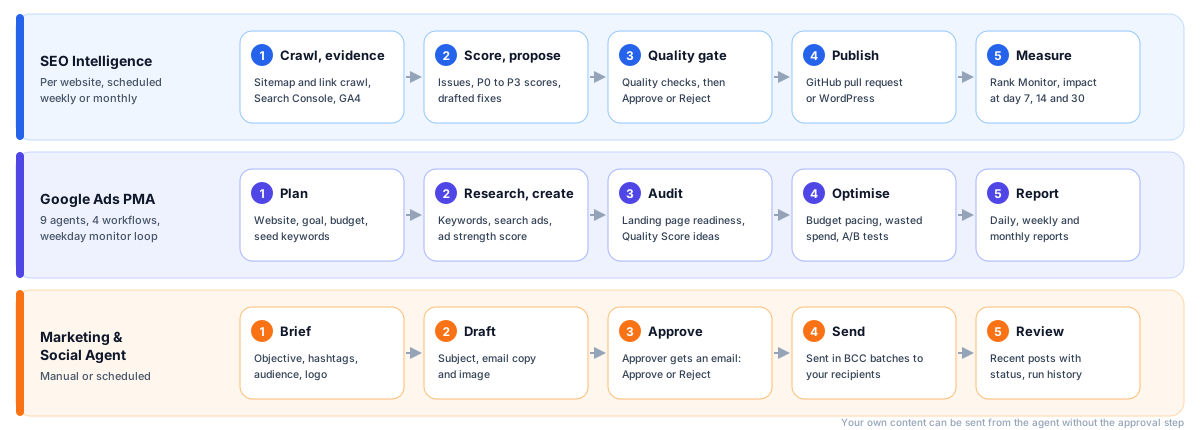
The building blocks behind marketing and SEO
Apps and setup wizards sit on top of templates. Templates run agents, agents call tools and data sources, and anything that changes your site or reaches your audience passes a review step first.
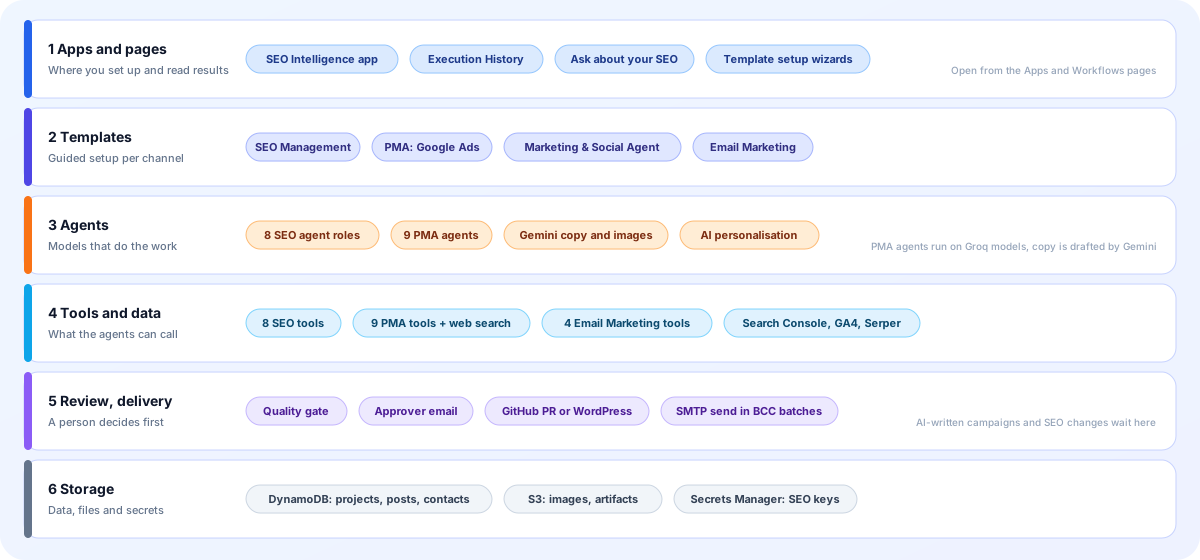
- Apps and pages: The SEO Intelligence app lists every website with its workflows and approvals. Setup wizards and run history live on the workflow template and Workflows pages.
- Templates: SEO Management, PMA — Google Ads and the Marketing & Social Agent each have a guided setup. Email Marketing has its own setup with contacts, cohorts and a campaign step.
- Agents: SEO runs eight agent roles. PMA runs nine. MSA uses Gemini to write copy and create images. Email Marketing can personalise content and write A/B subject variants.
- Tools and data: Eight SEO tools, nine PMA tools and four Email Marketing tools are in the tools catalog. Search Console, GA4, PageSpeed and Serper supply the SEO evidence.
- Review and delivery: SEO changes pass a quality gate and an approval. MSA emails an approver. Delivery is a GitHub pull request, WordPress or an SMTP send from your own sender.
- Storage: DynamoDB holds SEO projects, PMA campaigns and metrics, campaign posts and email contacts. S3 holds images and run artifacts. Secrets Manager holds SEO keys and tokens.
Screens you will use
Mock-ups with sample data, drawn from the real tabs, buttons and labels.
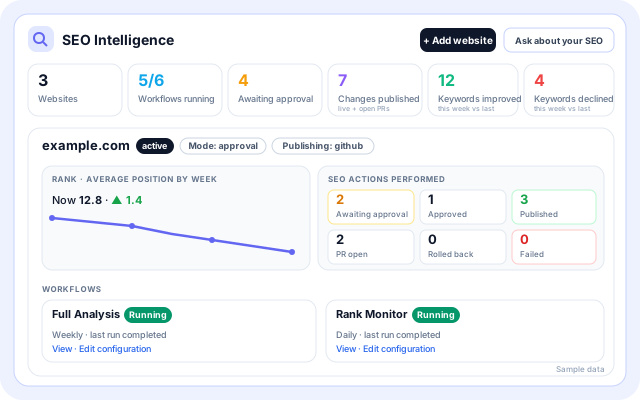
SEO Intelligence overview
Every monitored website with its workflow status, SEO actions and weekly rank movement, plus links to view or edit each configuration.
- Totals: Websites, Workflows running, Awaiting approval, Changes published, Keywords improved and declined.
- Full Analysis and Rank Monitor workflow cards per website.
- Action counts: awaiting approval, approved, published, PR open, rolled back and failed.
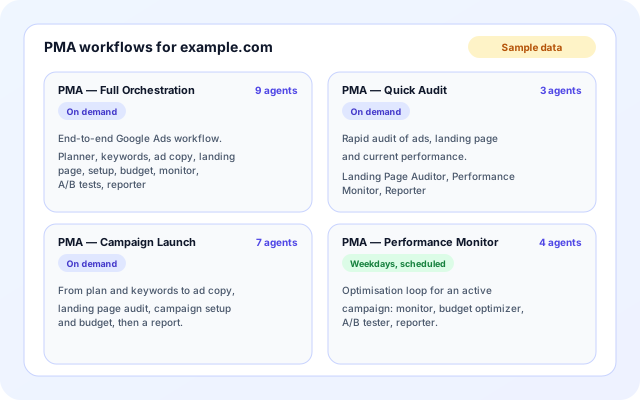
PMA workflows
Enabling PMA creates four workflows for your website. Three run on demand and one runs on a weekday schedule.
- Full Orchestration runs all nine agents from planning to reporting.
- Quick Audit uses three agents and Campaign Launch uses seven.
- Performance Monitor runs monitor, budget, A/B test and reporter agents on weekdays.
Generate & Review in MSA
The last step of the Marketing & Social Agent setup creates content, sends it to your approver and lists recent posts with their status.
- Generate Marketing Content, or Send Email Now when you supply your own email.
- Recent posts show Pending approval, Approved, Posted, Rejected or Failed.
- A recurring schedule can generate a new post automatically.
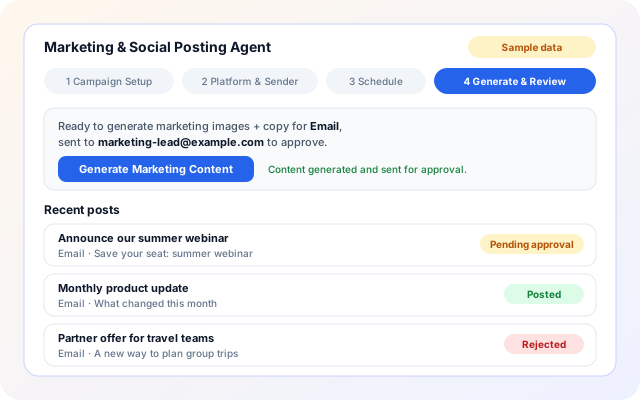
Marketing scenarios
Concrete ways teams put the building blocks to work.
- A weekly site check for a small team: Let Full Analysis run weekly and read the health score, new issues and rank changes, then approve the fixes worth making.
- An agency with several client sites: Add each site with Add website. Every one gets its own Full Analysis and Rank Monitor workflows and shows up in the all-websites overview.
- Technical fixes through GitHub: Proposed file changes stay inside the paths you allow and arrive as a pull request that your developers review and merge.
- A quick paid-search audit: Run PMA — Quick Audit on a website to get a landing page audit, a performance check and a report without setting up a launch.
- Launching a new Google Ads campaign: Run PMA — Campaign Launch for a plan, keywords, ad copy, a landing page audit, campaign setup steps and a budget view.
- A product announcement by email: Give MSA an objective and an audience. Approve the draft from the email you receive and it goes to your recipient list.
Systems named in the code
Only services the marketing building blocks actually use today.
- Google Search Console
- Google Analytics 4
- Google PageSpeed
- Serper (search results and rank checks)
- GitHub pull requests
- WordPress REST API
- Gemini (campaign copy and images)
- Groq models (agents)
- SMTP sender (Gmail app password, Office 365 or SES)
- Gmail (Email Marketing sender and contacts)
- Email approval links
- Amazon DynamoDB
- Amazon S3
- AWS Secrets Manager
Decisions stay with your team
What the building blocks enforce today, and what they do not promise.
- Quality gate on SEO proposals: Title and description length, a safe slug, a URL on your site, HTTPS sources, no executable HTML and no ranking guarantees are checked. Failing changes cannot be approved.
- Approval for AI-written campaigns: Generated MSA content is emailed to the approver with Approve & Publish and Reject links. Rejected posts are archived. If you supply your own email content, it is sent without approval.
- Pull requests, never auto-merged: GitHub changes open a pull request for your team to review. Approval links in SEO emails are signed and expire after seven days.
- Recommendations, not account changes: PMA produces plans and advice. The code has no Google Ads API connection, so changes to your ad account are made by your marketer.
- Sending guardrails: Campaign emails go out in BCC batches (50 by default, up to 500) with a pause between batches, a visible unsubscribe line and List-Unsubscribe headers.
- Credentials kept as secrets: SEO API keys and tokens are stored in AWS Secrets Manager per organisation and website. Rankings and ad performance are measured, never guaranteed.
What is included
- Full Analysis and Rank Monitor: Health score, issues, opportunities, position changes and drops for each website.
- Quality-gated SEO changes: Review, publish to GitHub or WordPress, restore and check impact at 7, 14 and 30 days.
- PMA specialist agents: Planning, keywords, ad copy, landing pages, setup, budget, monitoring, A/B tests and reports.
- PMA reports: Daily, weekly and monthly reports with trends, anomalies, wasted spend and recommendations.
- MSA content generation: Objective, hashtags and audience (generic, industry, job role or person) become copy, a subject line and an image.
- MSA scheduling: Interval, daily, weekdays, weekly or monthly runs with a time of day and timezone, or generate on demand.
- Email Marketing audiences: Import contacts from CSV or Gmail and build cohorts from rules or a plain-language intent.
- Email Marketing campaigns: Schedule or send now, with optional AI personalisation, A/B testing and open, click and bounce tracking.
Frequently asked questions
Can the platform guarantee higher search rankings?
No. Search engines decide rankings using many factors outside anyone control. The tools help you find issues, plan improvements and monitor changes, but they cannot promise a particular position or result.
Do I have to apply every proposed SEO fix?
No. SEO Intelligence presents proposals for review, and you decide which to act on. Check each suggestion against your site and goals, since not every recommendation will suit every page.
Can I use just one of the marketing templates?
Yes. SEO Management, Google Ads PMA and the Marketing and Social agent are separate templates. Enable only the ones relevant to your work and add others later if your needs grow.