Workflow templates
Workflow templates run on a schedule or trigger and orchestrate one or more agents. Each includes a guided setup, cost estimate and execution history.
- ERA Email Routing Agent: Hybrid rule and LLM email routing for shared inboxes, with labels, replies, forwards and archive actions.
- ERA Email Follow-up Monitor: Daily monitor that finds unanswered threads, reminds customers and escalates when an SLA window is missed.
- SEO Management: Crawl your site, audit metadata and content, read Search Console and GA4, and review proposed fixes before publishing.
- Google Ads Performance Agent: Multi-agent workflow that reviews Google Ads performance and recommends campaign improvements.
- Marketing & Social Agent: Generate campaign emails and images from an objective and audience, with approval before sending.
- Auto Trading Agent: NSE equity prediction signals with optional automated order placement through Angel One, inside your risk limits.
- Mock Interview Agent: Practice interviews with an AI interviewer that asks role-specific questions and gives structured feedback.
Agent templates
Agent templates are pre-configured specialists across seven categories: Research, Analytics, Knowledge Management, Customer Service, Development, Content Creation and Sales. Open Agent Studio to browse, customise and deploy them.
- Research and Search Agents: Search the web and your sources, compare findings and return cited summaries.
- Data Analysis and Validation Agents: Analyse datasets, validate quality and explain trends in plain language.
- Document Search (RAG) Agent: Answer questions from your own documents using retrieval-augmented generation.
- Customer Support Agent: Handle common customer questions, look up context and escalate to people when needed.
- Code Review Agent: Review code changes, flag risks and suggest improvements with explanations.
- Content Writer Agent: Draft articles, product copy and social posts in your tone, ready for review.
- Sales Assistant Agent: Qualify leads, draft outreach and prepare quotations from customer enquiries.
How to start a template
- Pick the template that matches the job you want done.
- Press its Start button. If you are not signed in you will be asked to log in first.
- Connect the accounts it needs and review the defaults.
- Enable it and follow results in the execution history.
- Public catalog: Browse every template, its category and what it does before you create an account.
- Guided setup: A stepper, required-field checks and in-page guides for each workflow template.
- Draft, then activate: Save your answers as a draft and activate when you are ready.
What the template system gives you
Two kinds of template, one clear difference
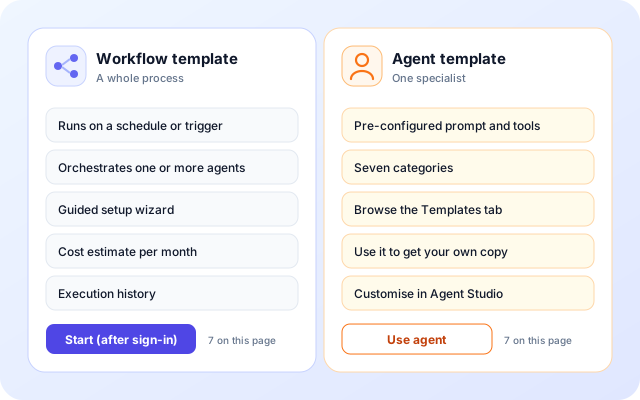
Workflow templates automate a complete process. Agent templates give you a single configured specialist. The catalog keeps them apart so you pick the right one.
- Workflow templates run on a schedule or trigger and can orchestrate several agents.
- Each workflow template has a guided setup, a cost estimate and execution history.
- Agent templates carry a system prompt, model, tools and memory settings.
- Using an agent template creates a private copy that you edit in Agent Studio.
A setup wizard that explains itself
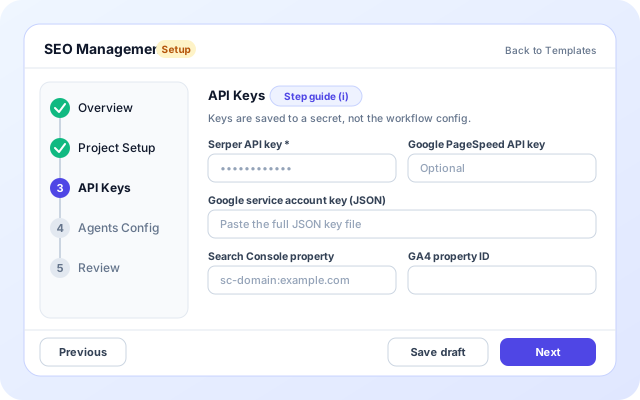
Each workflow template is described as steps and fields. The same setup page renders any of them, so every wizard behaves the same way.
- A stepper shows progress, from 4 steps for Google Ads to 7 for Auto Trading.
- Required fields are checked before you move on, with a Check this step message.
- Step guides explain things like creating a Google service account for SEO Management.
- Fields can appear only when another answer needs them, such as IMAP and SMTP server details.
Know the cost, then watch every run
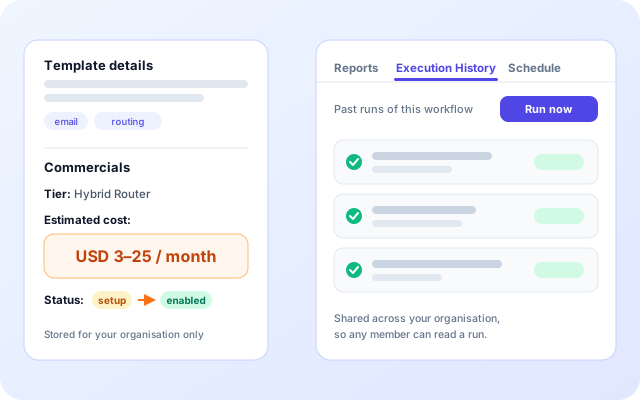
Before you activate, the setup page shows an estimated monthly cost for the template. After you activate, the workflow keeps an execution history.
- A Commercials panel shows the tier, the estimated cost and your status.
- Estimates are ranges, for example USD 3 to 25 a month for ERA email routing.
- Settings and status are stored per organisation, not shared across organisations.
- Run now and Execution History are in the workflow drawer, shared across your organisation.
Agent templates come from people, with review
Agent templates live in Agent Studio. Anyone with an agent can submit it as a template, and an admin decides whether it joins the public library.
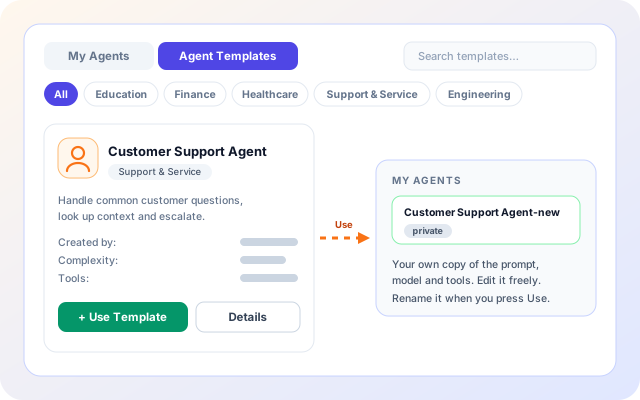
- Browse the Agent Templates tab by category and open Details before you commit.
- Use Template creates your own private agent from the template.
- Publish as Template sends an agent for review with a title, category and tags.
- Approved templates are published and the submitter is told by email.
From the catalog to a running template
The path is the same for every template. Only the wizard steps and the agent configuration differ.
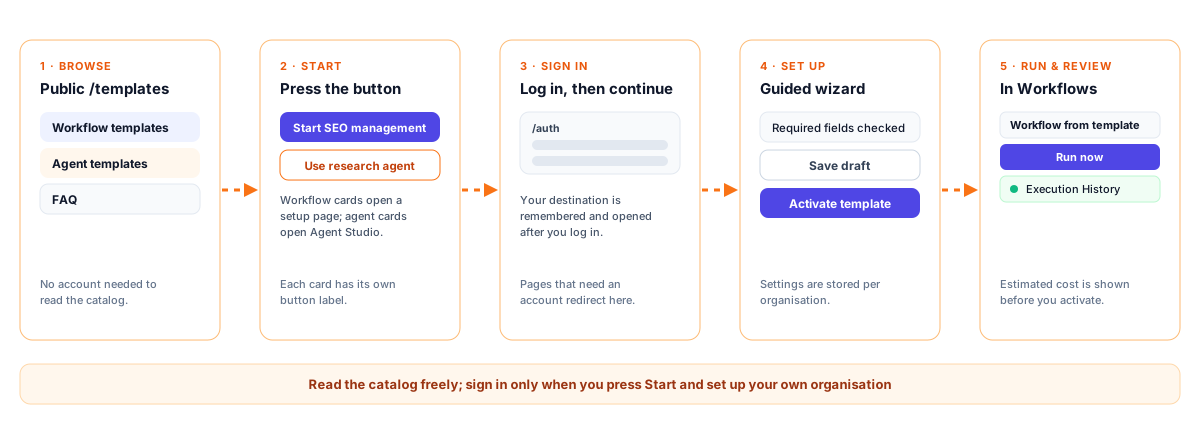
- Browse the catalog: Read the workflow and agent templates on /templates. No account is needed to look.
- Press Start: Each card has its own button, such as Start SEO management or Use research agent.
- Sign in if asked: Setup pages need an account. You are sent to log in and brought back to the page you chose.
- Set up and save: Work through the wizard, use Save draft at any step, then Activate template on the last one.
- Run and review: Open the workflow, use Run now if you like, and read its Execution History.
Browse, start, sign in, set up, run
How the template system is built
Three Lambda APIs serve the three jobs: workflow templates, agent templates and template requests. A TypeScript schema registry describes each wizard, so one setup page can render them all.
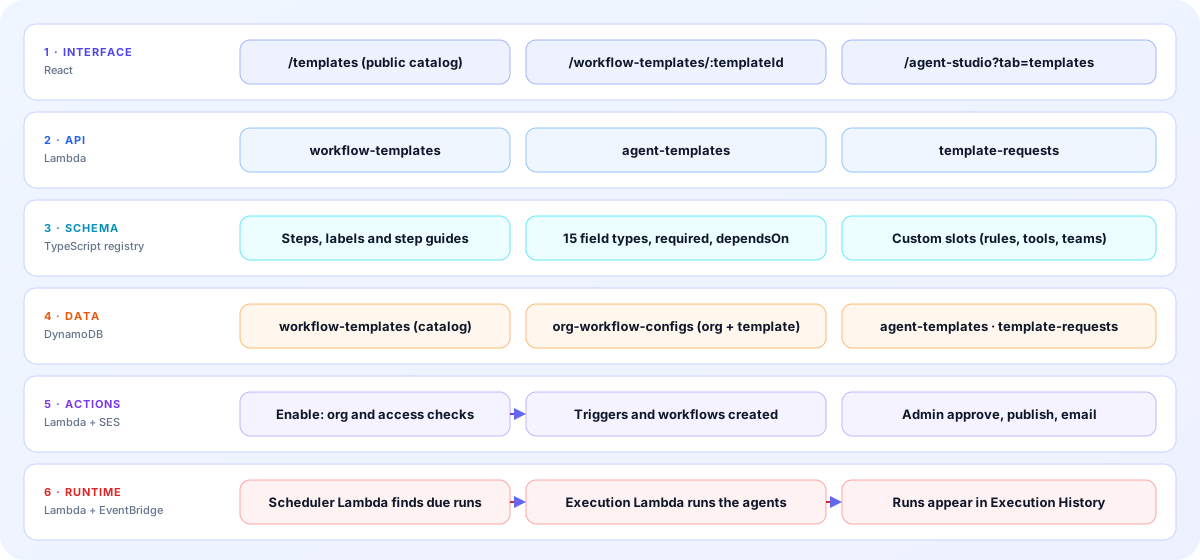
- Interface: The public /templates catalog, the signed-in setup page at /workflow-templates/:templateId, and the Agent Templates tab in Agent Studio.
- API: A workflow-templates Lambda for list, schema, config, enable and reset, an agent-templates Lambda for list, details, use and chat, and a template-requests Lambda for submit, list and decide.
- Schema: A registry of wizard definitions in TypeScript with steps, step guides, 15 field types, required flags, conditional fields and custom component slots.
- Data: DynamoDB tables for the workflow template catalog, per-organisation configuration, agent templates and template requests.
- Actions: Enable checks the organisation and the user's allowed templates, saves status and creates triggers. Approving a request writes a public agent template and emails the submitter.
- Runtime: The same scheduler and execution Lambdas that run any workflow run template workflows, and their runs appear in Execution History.
The screens you will use
Labels below are the ones shown in the product.
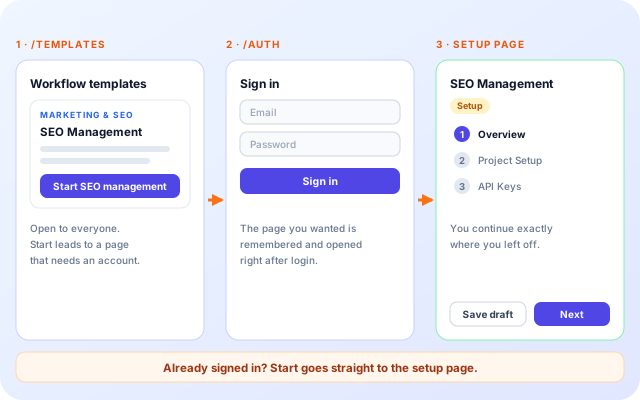
Start, sign in, land on setup
The Start button on a workflow card goes to the setup page. If you are not signed in, you log in first and then continue to that same page.
- The catalog is public.
- The setup page needs an account.
- Agent cards open Agent Studio on the Agent Templates tab.
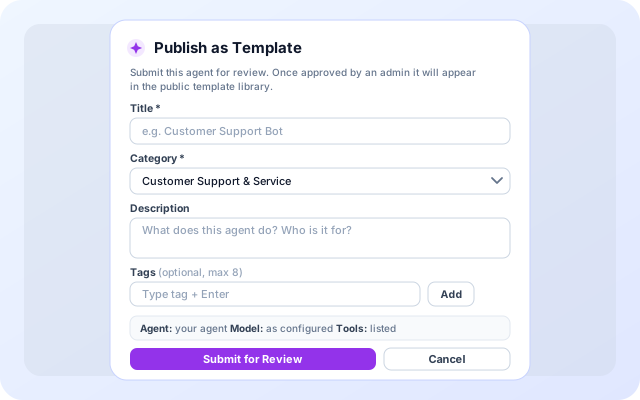
Publish as Template
From Agent Builder, a user submits an agent for the public library. The dialog asks for a few details and shows what will be shared.
- Title and Category are required; Description and up to 8 tags are optional.
- The category is chosen from a fixed list of ten.
- Submit for Review sends the request to an admin.
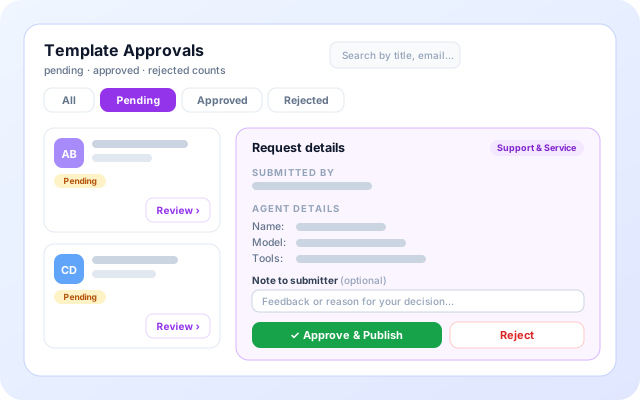
Template Approvals
Admins review submitted agents on one page, read the agent details and decide.
- Filter by All, Pending, Approved or Rejected, and search by title, email or category.
- Review opens the system prompt preview, model and tools.
- Approve & Publish or Reject, with an optional note to the submitter.
What you can start from a template
Each card matches a template on the page.
- Run shared-inbox email: ERA applies rules to known mail and an LLM to the rest, and the follow-up monitor chases unanswered threads and escalates when an SLA window is missed.
- Manage SEO for a website: SEO Management crawls the site, reads Search Console and GA4, and proposes changes you review before they are published through GitHub or WordPress.
- Review Google Ads: The Google Ads Performance Agent runs several specialist agents in sequence and recommends campaign improvements for approval.
- Plan and post campaigns: The Marketing & Social Agent drafts and publishes across email, LinkedIn, Facebook, Instagram and X, with a review before anything goes live.
- Trade within limits: The Auto Trading Agent produces daily NSE prediction signals and can place orders through Angel One inside the capital, risk and bucket limits you set.
- Start a specialist agent: Pick a research, analytics, document search, support, code review, content or sales agent and customise it in Agent Studio.
What templates connect to
Only systems named in the template catalog, setup wizards and approval flow are listed.
- Gmail (App Password)
- Custom IMAP/SMTP
- Angel One
- Google Search Console
- Google Analytics 4
- GitHub
- WordPress
- Google Ads
- LinkedIn
- Facebook
- Instagram
- X
- Agent Studio
- Amazon DynamoDB
- Amazon SES (approval emails)
Control and review
What stays under your control when you use or publish a template.
- Organisation scoped: Workflow template settings and status are saved per organisation and template, and enabling one needs an organisation.
- Access can be limited: A user can be restricted to specific workflow templates, and enabling any other one is refused.
- Admin review for agent templates: Submitted agents stay pending until an admin approves or rejects them. The approvals page and the decision are admin-only.
- Secrets kept out of config: The SEO Management wizard saves API keys and service account keys to a website-scoped secret, not to the workflow configuration.
Everything in the template system
- Public catalog: Seven workflow templates and seven agent categories, readable without signing in.
- Per-card start buttons: Each card opens the right place: a setup page for workflows, Agent Studio for agents.
- Guided wizard: Four to seven steps for the templates listed here, with a Previous and Next button.
- Required-field checks: Next and Activate stop on a missing required field and say which one.
- Save draft: Answers are saved as you go and a draft keeps your template in Setup status.
- Activate template: One action on the last step enables the template for your organisation.
- Cost estimate: A monthly range for each template, shown in the Commercials panel before you activate.
- Use, publish, approve: Use Template, Publish as Template and Approve & Publish cover the life of an agent template.
Workflow templates
ERA Email Routing Agent
Hybrid rule and LLM email routing for shared inboxes, with labels, replies, forwards and archive actions.
- Rules for known mail, LLM for the rest
- Gmail app password or IMAP and SMTP
- ERA labels show every outcome
Start email routing
ERA Email Follow-up Monitor
Daily monitor that finds unanswered threads, reminds customers and escalates when an SLA window is missed.
- Configurable reminder and escalation timing
- Works on any mailbox without routing
- Execution history of every reminder
Start follow-up monitor
SEO Management
Crawl your site, audit metadata and content, read Search Console and GA4, and review proposed fixes before publishing.
- Site crawl and quality-gated change proposals
- Search Console and GA4 data
- Publish through GitHub or WordPress
Start SEO management
Google Ads Performance Agent
Multi-agent workflow that reviews Google Ads performance and recommends campaign improvements.
- Several specialist agents working in sequence
- Campaign performance review
- Actionable recommendations for approval
Start Google Ads agent
Marketing & Social Agent
Generate campaign emails and images from an objective and audience, with approval before sending.
- Campaign planning and content drafting
- Email campaigns, social channels coming
- Review before anything goes live
Start marketing agent
Auto Trading Agent
NSE equity prediction signals with optional automated order placement through Angel One, inside your risk limits.
- Daily prediction signals
- Capital, risk and bucket limits
- Delivery or intraday workflows
Start auto trading
Mock Interview Agent
Practice interviews with an AI interviewer that asks role-specific questions and gives structured feedback.
- Role-specific question sets
- Feedback after each answer
- Repeatable practice sessions
Start mock interview
Agent templates
Research and Search Agents
Search the web and your sources, compare findings and return cited summaries.
- Web and source search
- Cited summaries
- Comparison of findings
Use research agent
Data Analysis and Validation Agents
Analyse datasets, validate quality and explain trends in plain language.
- Dataset exploration
- Data validation checks
- Plain-language insights
Use analytics agent
Document Search (RAG) Agent
Answer questions from your own documents using retrieval-augmented generation.
- Upload and index documents
- Grounded answers
- Source references
Use knowledge agent
Customer Support Agent
Handle common customer questions, look up context and escalate to people when needed.
- FAQ and ticket handling
- Tool-based lookups
- Human escalation
Use support agent
Code Review Agent
Review code changes, flag risks and suggest improvements with explanations.
- Change review
- Risk and style feedback
- Suggested fixes
Use code review agent
Content Writer Agent
Draft articles, product copy and social posts in your tone, ready for review.
- Briefs to drafts
- Tone and style control
- Editing passes
Use content agent
Sales Assistant Agent
Qualify leads, draft outreach and prepare quotations from customer enquiries.
- Lead qualification
- Outreach drafting
- Quotation preparation
Use sales agent
Frequently asked questions
Do I need to sign in to start a template?
Yes. The Start button takes you to the real setup page, which needs an account. After logging in you continue exactly where you left off.
What is the difference between a workflow and an agent template?
A workflow template automates a complete process with schedules, integrations and history. An agent template is a single configurable specialist you can use in chat or inside your own workflows.
Can I change a template after enabling it?
Yes. Workflow settings can be edited from the workflow page, and agent templates can be customised in Agent Studio.
Browse all templates