What the quotation agent does
- Understands free-form enquiries: destination, dates, quantities, budget and preferences.
- Applies your quotation policy, packages and markups from a configuration you control.
- Drafts a ready-to-send reply with the quotation attached or included inline.
- Escalates unusual or high-value requests to a person instead of guessing.
- Logs each quotation so follow-ups and conversions can be tracked.
How to get started
- Describe your packages and pricing rules or upload a sample quotation policy.
- Connect the mailbox that receives enquiries through the email routing template.
- Choose whether quotations are drafted for review or sent automatically under a limit.
- Add the follow-up monitor so unanswered quotations get a reminder.
Where it fits
The agent works best for businesses where many enquiries look alike but are phrased differently, such as travel agencies, event planners, B2B suppliers and service providers. Because it runs on the same platform as email routing, enquiries can be routed to the quotation agent automatically and other mail can go elsewhere.
Control and safety
You decide which tools the agent can use and which actions require approval. Quotation limits, escalation rules and review steps keep pricing decisions with your team while the agent removes the repetitive drafting work.
- Approve before sending: Draft only, or auto-send under a limit
- Your pricing policy: Packages, rates and rules you control
- Follow-up tracking: Reminders for unanswered quotations
Benefits of the Smart Quotation Sales Agent
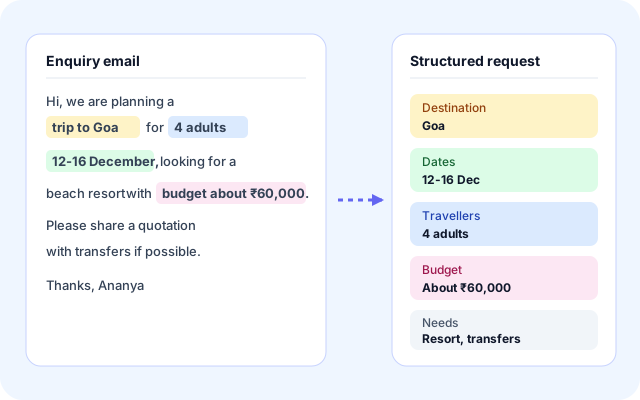
Understand every enquiry
Free-form emails are turned into a structured request, so your team does not have to re-read long threads to find the destination, dates, quantities and budget.
- Reads destination, dates, quantities, budget and preferences.
- Works with enquiries phrased in many different ways.
- Flags missing details instead of guessing.
- Connects to your mailbox through email routing.
Price from your policy
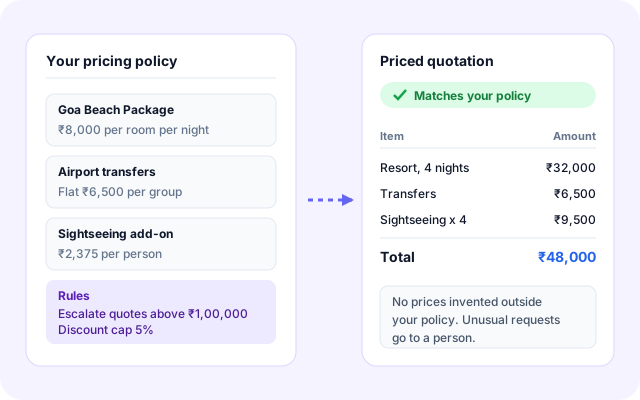
Quotations are built from the packages, rates and rules you provide. The agent applies your policy and does not invent prices outside it.
- Packages, rates and markups kept in one configuration.
- Consistent pricing across the whole team.
- Limits and escalation rules for unusual requests.
- Every figure traces back to the rule that produced it.
Review and approve
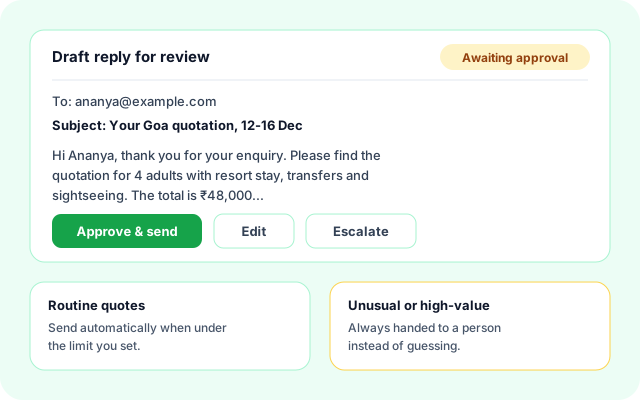
Your team stays in control. Drafts wait for approval, routine quotes can go out automatically under limits you define, and unusual requests are handed to a person.
- Ready-to-send reply with the quotation included.
- Approve, edit or escalate with one click.
- Optional auto-send for routine quotes under a limit.
- High-value requests always reach a person.
Follow up reliably
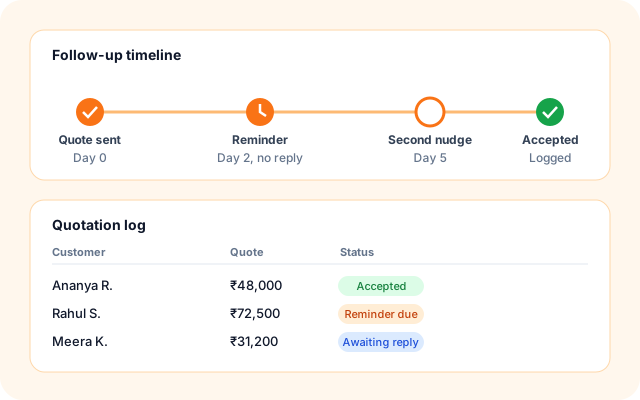
Every quotation is logged, and the follow-up monitor reminds you when a customer has not replied, so fewer enquiries go cold.
- A log of every quotation and its status.
- Reminders for unanswered quotations.
- Link quotations to CRM records and tasks where configured.
- See which enquiries turned into bookings.
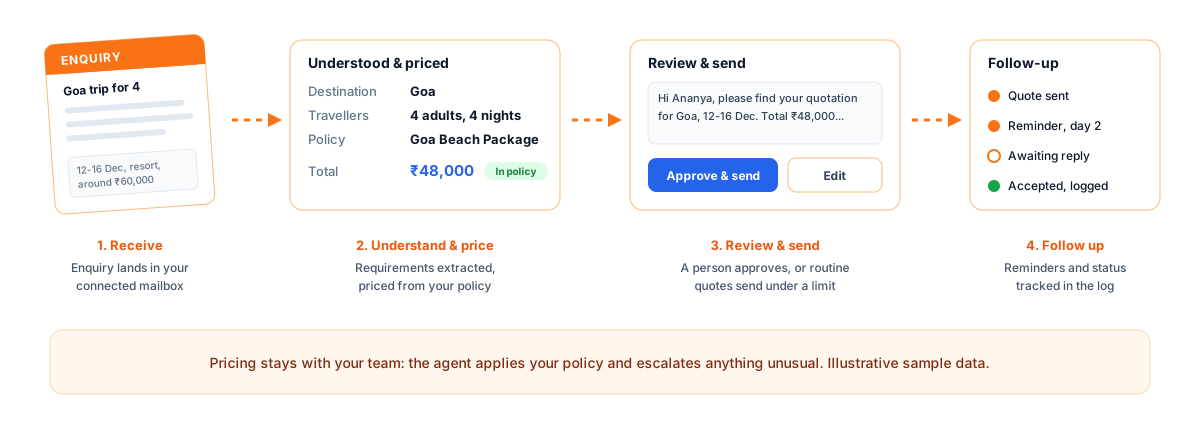
Five simple steps from enquiry to quotation.
Connect your mailbox and pricing policy, then let the agent draft quotations while your team stays in control of what goes out.
- Receive: An enquiry email arrives in your connected mailbox.
- Understand: The agent extracts destination, dates, quantities and budget.
- Price: Your packages, rates and rules are applied to the request.
- Approve: A person reviews the draft, or routine quotes send under a limit.
- Follow up: Quotations are logged and reminders go out when there is no reply.
From a free-form enquiry to an approved quotation.
Everything you need to quote faster.
- Enquiry understanding: Read free-form emails and extract the details needed to quote.
- Policy-based pricing: Apply your packages, rates and markups from a configuration you control.
- Drafts and approvals: Draft replies for review, with optional auto-send under limits you set.
- Follow-up tracking: Log each quotation and remind your team when a customer has not replied.
Frequently asked questions
Can I review quotations before they are sent?
Yes. You can set the agent to draft only, so a team member reviews and sends each quotation, or allow automatic sending for routine requests under limits you define.
How does the agent know my prices?
You provide a quotation policy with packages, rates and rules. The agent applies that policy and does not invent prices outside it.
Can it work with my existing CRM or calendar?
The platform offers CRM, ticketing and calendar tools that agents can call, so quotations can be linked to customer records and follow-up tasks.