What it does
- Crawls the monitored site and checks robots.txt, titles, descriptions and headings.
- Finds thin pages, missing internal links and duplicate metadata.
- Reads Google Search Console and GA4 data when you connect them.
- Tracks keyword rankings over time.
- Writes proposed fixes and runs a quality check before anything is published.
- Exports reports for sharing and keeps a history of every run.
How a run works
- Enable the SEO Management template and enter the website to monitor.
- Connect optional sources such as Search Console, Analytics, GitHub or WordPress.
- Start a run. It appears in the execution history immediately as running.
- Read the report, review proposed changes and publish the ones you approve.
Quality gate
Suggested titles, descriptions and pages are checked against length limits and content rules. Anything failing the check is held for human review rather than published automatically.
Who it is for
Founders, marketers and developers who want a steady SEO process without stitching together separate crawlers, rank trackers and writing tools.
Reports you can share
Each run produces a report with a short summary, prioritised actions and the evidence behind them. Open it in the browser or download it as a PDF to share with clients or colleagues. Page-level fixes can be reviewed before anything is published, and approved changes can be pushed to your Git repository as a pull request.
- Audit with evidence: Crawl data joined with Search Console and GA4
- Rank tracking: Daily, weekly or monthly keyword checks
- Approval before publish: Quality gate, then a named human decision
What the app does for your site
Audit your site like a search engine
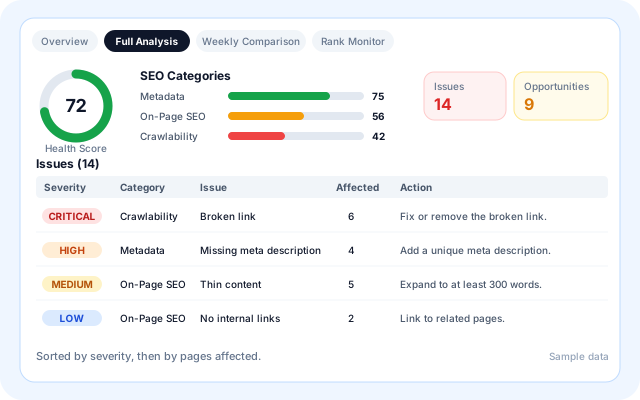
Full Analysis crawls the sitemap and links, checks every page and groups what it finds into a health score, SEO categories and a severity-ranked issue list with a recommended action for each.
- Titles, meta descriptions, H1 headings, canonicals, noindex, alt text and thin content.
- Broken links, redirects, duplicate titles and duplicate content.
- Mobile PageSpeed checks for LCP, CLS and INP on the home page.
- Categories: Technical SEO, On-Page SEO, Metadata, Crawlability and Content Signals.
Track keyword rankings over time
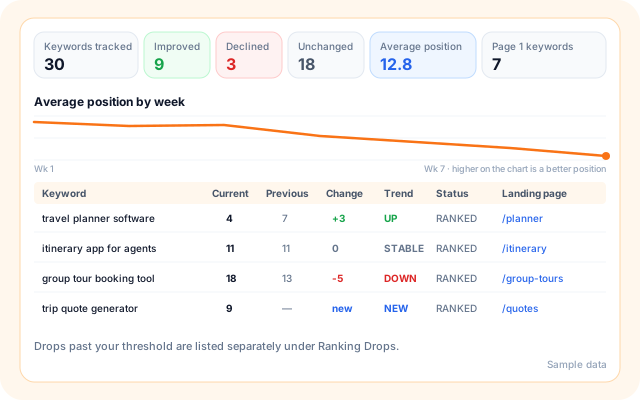
Rank Monitor checks the position of your seed keywords through Serper, compares each run with the previous one and lists what improved, declined or newly ranked.
- Keywords tracked, improved, declined and unchanged, plus average position.
- Page 1 keywords and page 2 opportunities.
- Per keyword: current, previous, change, trend, status and landing page.
- A separate Ranking Drops list when a keyword falls past your threshold.
Get fixes you can review and approve
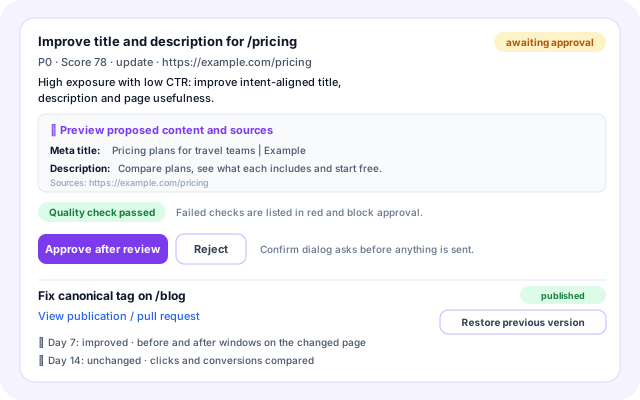
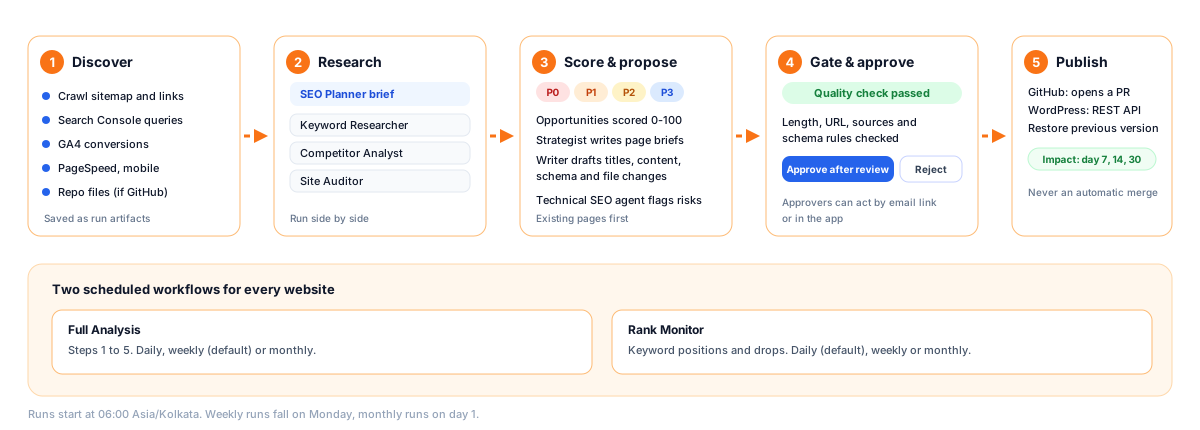
Opportunities are scored, then specialist agents draft the change: a new title and description, page content, schema or a technical file edit. Each proposal shows its rationale, preview and sources.
- Priority P0 to P3 and a score, with the evidence behind it.
- A quality check blocks failing proposals from approval.
- Approve after review, Reject, Publish / Open PR, or Restore previous version.
- Impact checks at day 7, 14 and 30 compare the changed page before and after.
Run on a schedule, under your policy
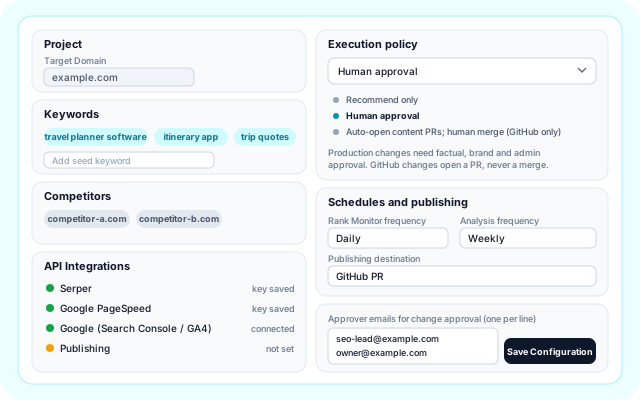
Each website gets two scheduled workflows. You choose how often they run, which publishing destination to use and whether changes are only recommended or need approval.
- Rank Monitor frequency and Full Analysis frequency: daily, weekly or monthly.
- Publishing destination: recommendations only, WordPress or a GitHub pull request.
- Up to 10 approver emails for change approval.
- Crawl page cap, ranking drop threshold and new-page limits.
From adding a website to approved changes
The guided setup has five steps: Overview, Project Setup, API Keys, Agents Config and Review. After that, runs happen on their own schedule.
- Add your website: Enter the target domain, seed keywords and competitors in Project Setup, plus country, language and business goal.
- Connect your sources: Add Serper and PageSpeed keys, Google access for Search Console and GA4, and optional GitHub or WordPress publishing.
- Choose schedule and policy: Set run frequency, execution policy, content tone and limits in Agents Config, then activate.
- Read the analysis: Use Overview, Full Analysis, Weekly Comparison and Rank Monitor to see health, issues, opportunities and movement.
- Review and publish: Approve or reject proposed changes. Approved changes open a pull request or go to WordPress.
Discover, research, propose, approve, publish and measure
How SEO Intelligence is built
A React app calls Lambda routes under /api/seo. Scheduled workflows run specialist agents over real evidence, and nothing is published without passing a quality gate and a decision.
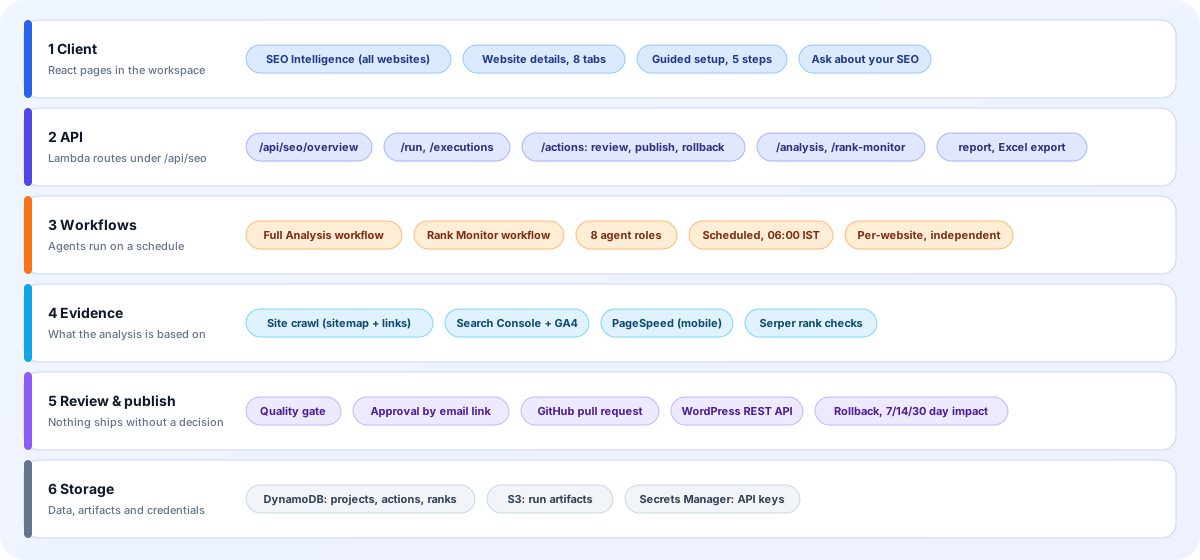
- Client: The SEO Intelligence app lists every website. Website details has eight tabs. A five-step guided setup creates a website and its workflows.
- API: Routes under /api/seo cover projects, overview, config, runs and executions, change review and publishing, analysis, rank monitor results and reports.
- Workflows: Each website gets an independent Full Analysis workflow and Rank Monitor workflow, scheduled at 06:00 Asia/Kolkata and run by eight agent roles.
- Evidence: A bounded crawl of the sitemap and links, Search Console and GA4 data, PageSpeed measurements and Serper results ground every recommendation.
- Review and publish: Proposals are validated, then approved in the app or by an email link. Publishing goes to a GitHub pull request or WordPress, with rollback and impact checks.
- Storage: Projects, actions and rank history sit in DynamoDB, run artifacts in encrypted S3, and API keys and tokens in AWS Secrets Manager.
Screens you will use every day
Mock-ups with sample data, drawn from the real labels, tabs and columns in the app.
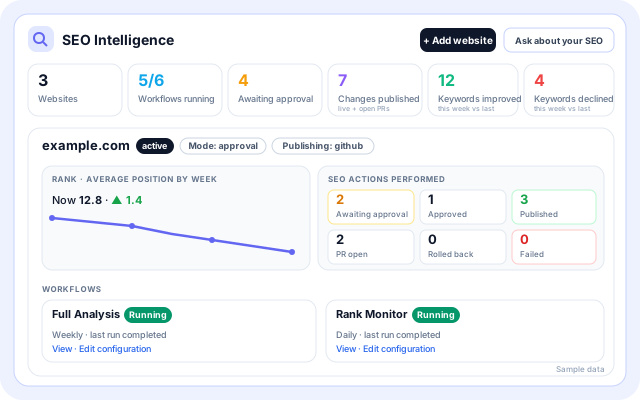
All websites at a glance
The app overview shows every monitored website with its workflow health, SEO actions and weekly rank movement, and links to view or edit each configuration.
- Totals: Websites, Workflows running, Awaiting approval, Changes published, Keywords improved and declined.
- Per website: mode, publishing target and average position by week.
- Action counts: awaiting approval, approved, published, PR open, rolled back and failed.
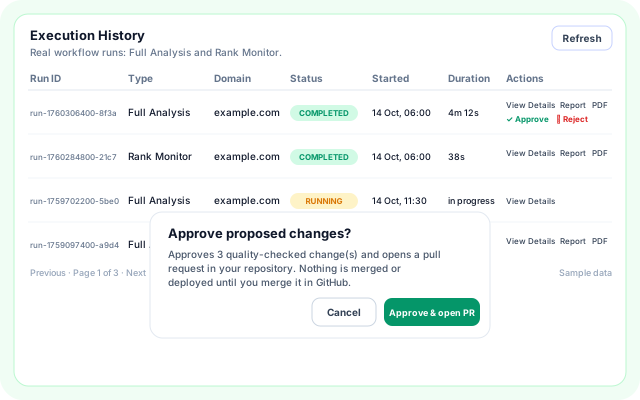
Execution History and approval
Every Full Analysis and Rank Monitor run is listed with its status and duration. Open the details, the report or a PDF, and approve or reject a run's proposed changes.
- Columns: Run ID, Type, Domain, Status, Started, Duration and Actions.
- Approving opens a pull request and never merges it.
- Rejecting marks the pending changes of that run as rejected.
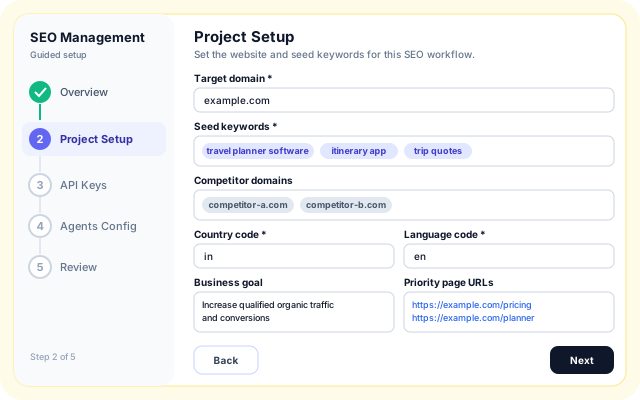
Guided setup
The SEO Management template walks through Overview, Project Setup, API Keys, Agents Config and Review, then creates the workflows for the website.
- Target domain, seed keywords and competitor domains.
- Country and language codes, business description and goal, priority page URLs.
- Required fields are marked, and the domain and at least one keyword are needed to continue.
Where teams use SEO Intelligence
One process, set up once per website.
- A steady weekly SEO check: Let Full Analysis run weekly and read the health score, new issues and resolved issues in Weekly Comparison.
- Several websites, one view: Add each site with Add website. Every one gets its own workflows and appears in the all-websites overview.
- Technical fixes through GitHub: Proposed file changes stay inside the allowed paths you list and arrive as a pull request that your team reviews and merges.
- Content updates on WordPress: Approved titles, descriptions and page content go to existing posts and pages through the WordPress REST API.
- Ranking drops that need attention: Track seed keywords against competitors and see declines past your threshold in a dedicated list.
- Sign-off by email: Send a run to named approvers, who can approve or reject it from a link without opening the app.
Connects to the tools your SEO already relies on
Only the systems the code actually uses.
- Google Search Console
- Google Analytics 4
- Google PageSpeed
- Serper (search results and rank checks)
- GitHub pull requests
- WordPress REST API
- Email approval links
- AWS Secrets Manager
- Amazon S3 (run artifacts)
- Amazon DynamoDB
- Excel report export
- Ask about your SEO (app chat)
Controls before anything goes live
What the app enforces today.
- Quality gate on every proposal: Checks cover title and description length, a safe slug, a URL on your site, HTTPS sources, no executable HTML, valid schema and no ranking guarantees. Failing changes cannot be approved.
- Human approval policy: Choose recommend only, human approval, or auto-open content PRs with a human merge. GitHub changes open a pull request and are never merged for you.
- Signed, expiring approval links: Email approval links are signed, expire after seven days and are bound to one organisation, website, run and approver.
- Credentials in Secrets Manager: Serper, Google and publishing credentials are stored as secrets under a per-organisation, per-website name, and saved keys are shown masked.
- Admin-only settings and bounded crawling: Only organisation administrators can save SEO settings. The crawl is capped by a page limit and validates that addresses are public before fetching.
- Rollback and measured impact: Restore the previous version of a published change, and check clicks and conversions on the changed page after 7, 14 and 30 days.
What is included
- Full Analysis: Health score, issues, opportunities and recommendations for each run.
- Rank Monitor: Position changes, trends, page 1 and page 2 keywords, and drops.
- Weekly Comparison: Week-by-week health score, issue counts and what changed.
- Opportunity scoring: P0 to P3 priority and a score from impressions, clicks, position and conversions.
- Execution History: Every run with status and duration, plus report and PDF.
- Changes & Impact: Review, publish, restore and verify, with 7, 14 and 30 day checks.
- Technical fixes: File edits proposed within the GitHub paths you allow.
- Multi-website overview: Workflow status and SEO actions for every site on one page.
Frequently asked questions
Can it publish changes for me?
When GitHub or WordPress access is connected, approved changes can be pushed for review. Nothing is published without passing the quality gate.
Do I need Search Console connected?
No, but connecting it adds impressions, clicks and query data to the analysis.
How much does it cost to run?
Running cost depends on crawl size and options. See pricing and billing for current estimates.