What the Travel Planner Agent does
- Ask for missing details such as dates, origin, travellers, budget and pace.
- Search flights, hotels, activities, places and routes through connected travel tools.
- Check weather before committing a day to an activity.
- Assemble outbound and return flights, a hotel for the stay and activities for each day.
- Validate the itinerary and report issues along with the total price.
- Save each plan with an itinerary ID so it can be fetched and revised later.
Five steps from request to itinerary
- Describe the trip in your own words.
- The agent asks for anything it still needs.
- It searches flights, hotels, activities and weather.
- It builds and validates a day-by-day itinerary.
- You review, refine and reopen the saved plan.
Where you can use it
The Travel Planner is available through the Coderva AI Assistant, which routes trip-planning questions to it, and as a Travel Planner tool that you can add to your own agents in Agent Studio. Travel agencies can pair it with email routing and quotation agents so enquiries become itineraries quickly.
Dependable by design
Itineraries come from tool results rather than guesses, are checked by a validator before they are saved, and show the price and any issues openly. Your team can review a plan before it is shared with a customer.
- Plan in conversation: Refine the trip in plain language
- Travel tools: Flights, hotels, activities and weather
- Validated and saved: Issues flagged and itineraries stored
Benefits of the Travel Planner Agent
Plan trips in conversation
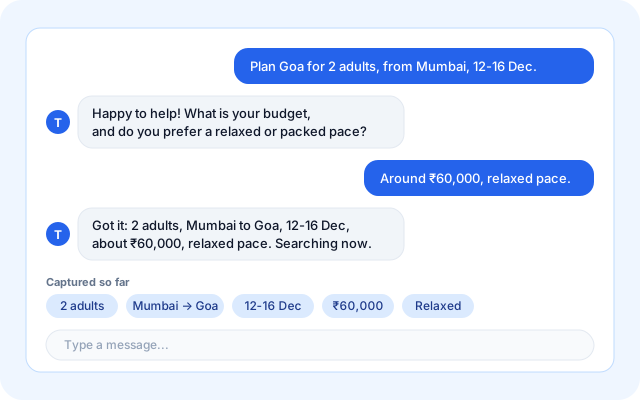
Tell the agent where, when, who and how much. It asks for whatever is missing and keeps the conversation going as you refine the plan.
- Natural language requests with follow-up questions.
- Dates, origin, travellers, budget and pace captured.
- Change the plan with simple instructions.
- Available through the Coderva AI Assistant.
Search the options that matter
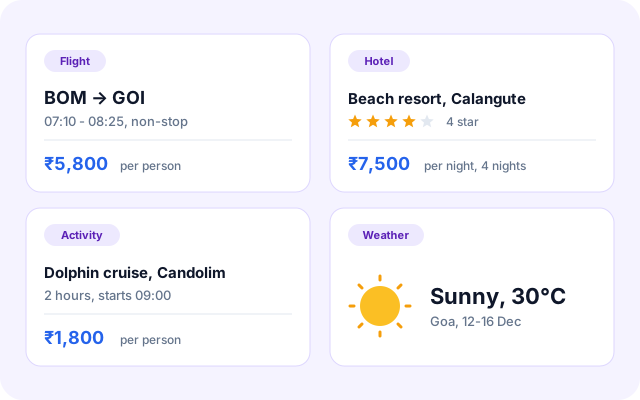
The agent calls travel tools for flights, hotels, activities, places and routes, and checks the weather, and the results are shown in the plan. Provider connections for live fares and rooms are still being added, so results today are sample data.
- Flights, hotels and activities in one request.
- Places and routes between stops.
- Weather checked against each planned day.
- Preferences such as hotel rating and pace respected.
Get a complete day-by-day itinerary
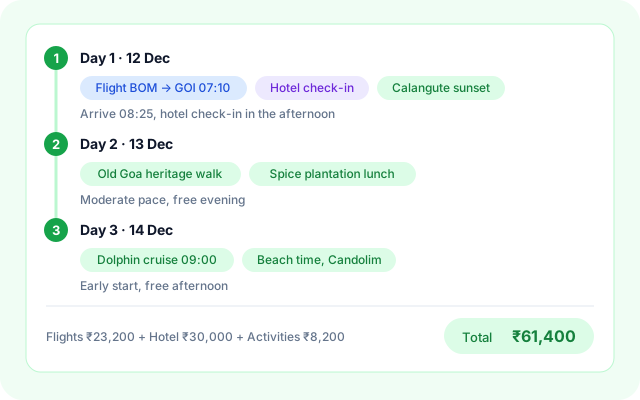
Flights, hotel and activities are assembled into a plan for each day, with the total price shown alongside.
- Outbound and return flights included.
- A hotel for the full stay.
- Activities grouped by day.
- Total price shown with the plan.
Validate and save for later
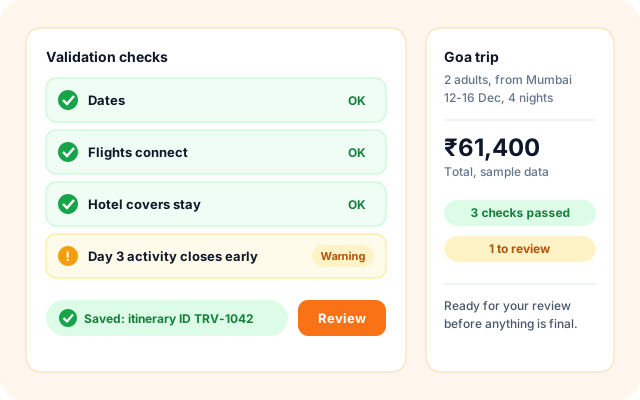
Each itinerary is checked before it is stored, and any issues are listed so your team can fix them before sharing the plan with a customer.
- Validation issues listed clearly.
- Saved with an itinerary ID.
- Reopen and revise any saved plan.
- Review before it reaches a customer.
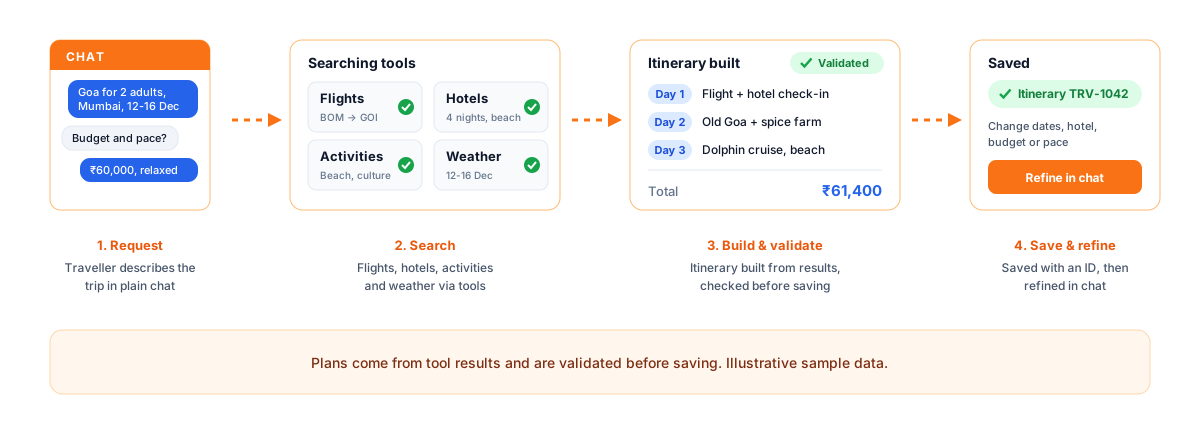
Five simple steps from request to itinerary.
Start with a sentence about your trip. The agent does the searching, assembling and checking, and you stay in control of the final plan.
- Describe: Say where, when, with whom and on what budget.
- Clarify: The agent asks for any missing details.
- Search: Flights, hotels, activities and weather are searched.
- Build: A day-by-day itinerary is assembled and validated.
- Save: The plan is stored so you can refine or reopen it.
From a trip request to a saved itinerary.
Everything for planning a trip.
- Conversational planning: Plan and refine trips through chat, with follow-up questions.
- Travel search tools: Search flights, hotels, activities, places and routes, and check weather.
- Itinerary builder: Assemble flights, a hotel and daily activities into one plan with a total price.
- Validation and storage: Check each plan, list the issues and save it for later.
Frequently asked questions
Can I change the plan after it is created?
Yes. Ask for changes in conversation, such as a slower pace or a different hotel category, and the agent revises the plan. The saved itinerary can be fetched again by its ID.
What does it search?
Flights, hotels, activities, places, routes and weather, using the travel tools connected to the agent.
Does it book anything automatically?
No. It plans and saves itineraries with indicative prices and validation results. Booking decisions stay with you or your team.
Can a travel agency use it for customer enquiries?
Yes. It fits alongside email routing and the quotation agent, so a team can turn an enquiry into a draft itinerary and review it before replying.