What email routing management covers
- Classify inbound email by sender, subject, body and attachment hints.
- Forward, reply, archive or escalate automatically, with every action labelled in the mailbox.
- Send unmatched or ambiguous email to an LLM agent instead of leaving it in a queue.
- Connect Gmail with an app password or any custom IMAP and SMTP server.
- Review a running history of what was routed, skipped or escalated.
How the hybrid router works
- Connect the mailbox you want to manage and choose the sync window.
- Define routing rules for the mail you already know how to handle, such as invoices, enquiries or vendor notices.
- Choose the tools the agent may use for the remaining mail, for example CRM, ticketing, calendar or archive tools.
- Enable the workflow. New mail is checked against rules first and only falls through to the LLM when no rule matches.
Why rules plus an LLM
Pure rule engines break when customers write in unexpected ways, and pure LLM routing is harder to predict and more expensive at volume. The hybrid approach gives you rule-level predictability for the common cases and language understanding for the long tail. Cost stays low because most messages never reach the model.
Who uses it
Support desks, operations teams, travel and sales teams that share one or more mailboxes and need consistent handling without hiring more people to sort email. Pair it with the follow-up monitor to remind customers and escalate stalled threads automatically.
Benefits of email routing management
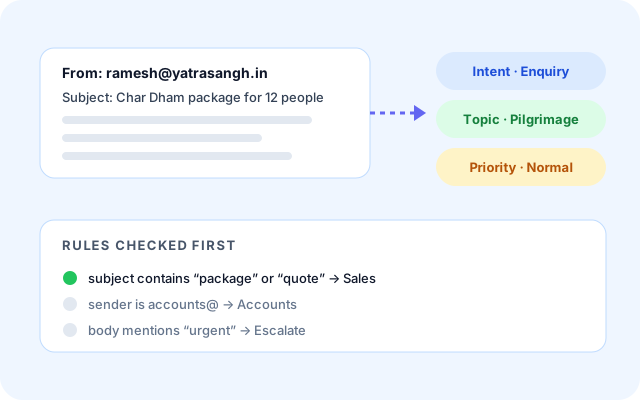
Classify every inbound email
ERA understands who is writing and why, so enquiries, invoices, vendor notices and urgent requests land in the right place.
- Match on sender, subject, body and attachment hints.
- Rules for the mail you already know how to handle.
- Choose the sync window that suits the mailbox.
- Edit rules any time in a guided wizard, no code.
Act automatically, not just sort
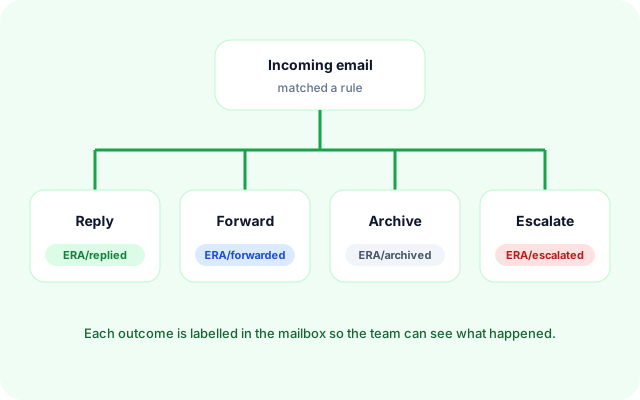
Routing is only useful if something happens next. ERA replies, forwards, archives or escalates and labels the outcome.
- Reply, forward, archive or escalate per rule.
- Every outcome labelled in the mailbox for easy review.
- Escalate urgent mail to a human immediately.
- Pair with the follow-up monitor for stalled threads.
An LLM agent for the long tail
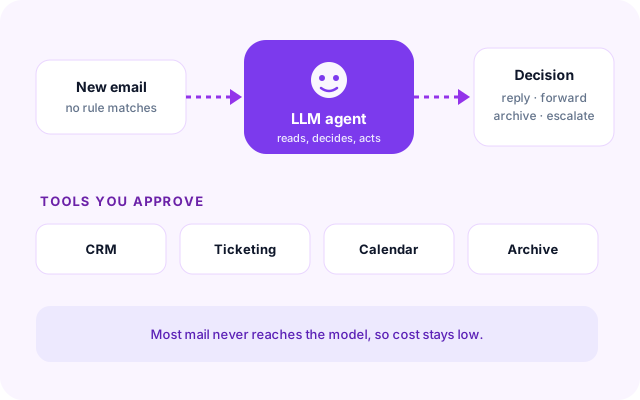
When no rule matches, the message goes to an agent that can use only the tools you approve instead of waiting in a queue.
- Approve tools such as CRM, ticketing, calendar or archive.
- Most mail never reaches the model, so cost stays low.
- Predictable rules plus flexible language understanding.
- Fall back to a human whenever you choose.
Stay in control and auditable
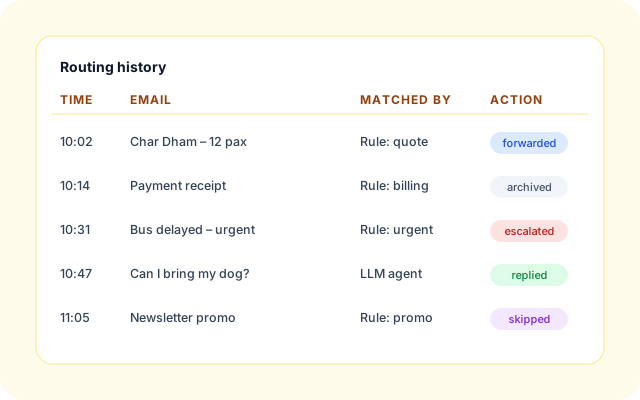
Routing stays explainable. See what was routed, skipped or escalated, and why.
- Running history of rule matches and agent decisions.
- Mailbox labels show the outcome at a glance.
- Change rules or tools without redeploying anything.
- Extend the workflow in the visual builder when needed.
How Balaji Travels handles pilgrimage enquiries with ERA
Balaji Travels (balajitravels.org) organises pilgrimage and spiritual tours across North India, including Varanasi, Ayodhya, Prayagraj, Char Dham and Jyotirlinga circuits. Their shared inbox receives group enquiries, payment receipts, vendor notices and urgent on-trip messages, and ERA now sorts and acts on them. Balaji Travels
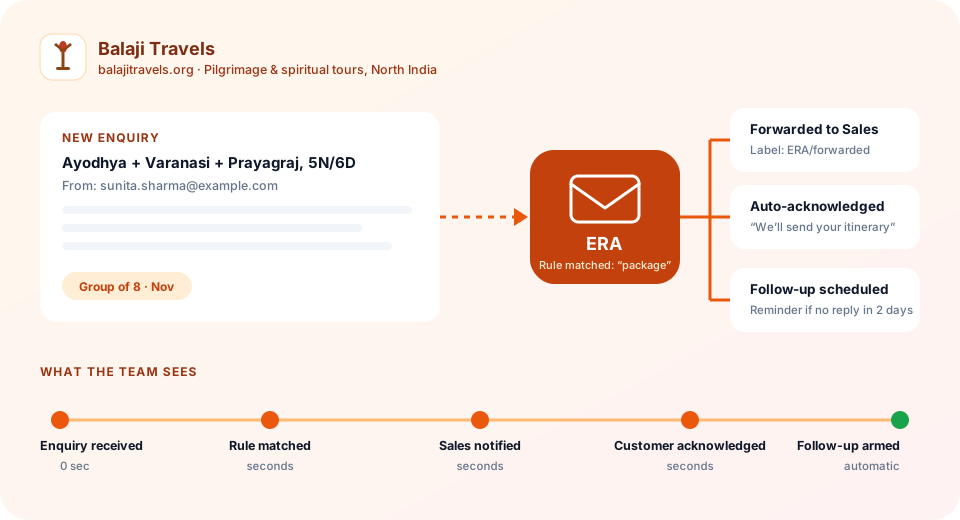
- Group package and quote enquiries forwarded to Sales.
- Payment receipts and invoices labelled and archived for Accounts.
- Hotel, bus and vendor notices sent to Operations.
- Urgent on-trip messages escalated to a human immediately.
ERA handles our booking emails end-to-end. Routing, follow-ups and reminders happen automatically, and we have stopped losing leads to slow responses.
- Leads lost to slow replies: Enquiries sat unread between sales calls while customers moved on.
- Mixed inbox: Enquiries, receipts, vendor notices and emergencies all arrived in one place.
- Manual sorting: Staff spent time forwarding and labelling mail instead of selling tours.
Control, security & auditability
Built so operations and compliance teams can trust what the router does with their mail.
- Your mailbox, your credentials: Connect Gmail with an app password or any IMAP and SMTP server.
- Explainable decisions: Rule matches and agent decisions are recorded with the action taken.
- Approved tools only: The agent can call only the tools you enable for the workflow.
- Human escalation: Route sensitive or ambiguous mail to a person at any time.
- Organisation isolation: Workflows, rules and history stay scoped to your organisation.
- Change without code: Edit rules and preferences in the wizard; no redeploy required.
Everything in the routing workflow
- Guided setup wizard: Connect the mailbox, add rules and choose tools in minutes.
- Rule engine: Deterministic routing for predictable mail.
- LLM fallback agent: Handles anything the rules do not cover.
- Follow-up monitor: Remind customers and escalate stalled threads.
- Mailbox labels: Reply, forward, archive and skipped outcomes at a glance.
- Visual workflow builder: Extend the workflow when you need more control.
Frequently asked questions
Which mail providers does ERA support?
Gmail through an app password, and any provider that offers IMAP for reading and SMTP for sending. You enter the server details once during guided setup and can change them later.
Can I see why an email was routed a certain way?
Yes. Rule matches and agent decisions are recorded with the action taken, and the mailbox label shows the outcome such as reply, forward, archive or skipped.
Do I need to write code to set up routing?
No. Rules, tools and preferences are configured in a guided wizard. Teams that want more control can extend the workflow in the visual builder.