Use cases
- Route new enquiries by destination, trip type or request so the right consultant sees them.
- Support quotation emails with consistent structure and wording.
- Remind staff when a customer enquiry has not yet received a reply.
- Escalate quotes and enquiries that have been waiting longer than your target time.
- Keep a history of how each enquiry was handled for review and training.
Apps and templates that apply
- ERA email routing and follow-up: the workflow template used for enquiry routing.
- ERA Email Management: the app interface for routed mail.
- ERA Smart Quotation: drafts quotation replies from your package rules.
- Workflows: scheduling and execution history for routing and follow-ups.
How it works
- Enable the ERA email routing template and connect the enquiry mailbox through the setup wizard.
- Define routing rules, for example by destination, package type or customer request.
- Set up how quotation emails should be worded and who sends them.
- Configure follow-up timings so open enquiries trigger reminders and escalations.
- Review early runs, adjust the rules and extend them as your offerings change.
Who it is for
This domain suits travel agencies, tour operators and hospitality businesses where enquiries arrive by email and speed and consistency matter. The agent supports your consultants rather than replacing them, and pricing, availability and booking decisions remain with your team. Review outgoing quotation content, especially in the first weeks of use. As your packages and destinations change, update the rules and wording so that routing and quotation emails keep matching what your agency actually sells.
- Quotes you approve: The priced quote can go to your team first, with an Approve and send action.
- Email and WhatsApp: ERA routes the shared mailbox and WRA routes WhatsApp Business numbers.
- Follow-up built in: Customers get reminders and your team gets escalations when a thread goes quiet.
What a travel desk gets
Route every enquiry to the right person
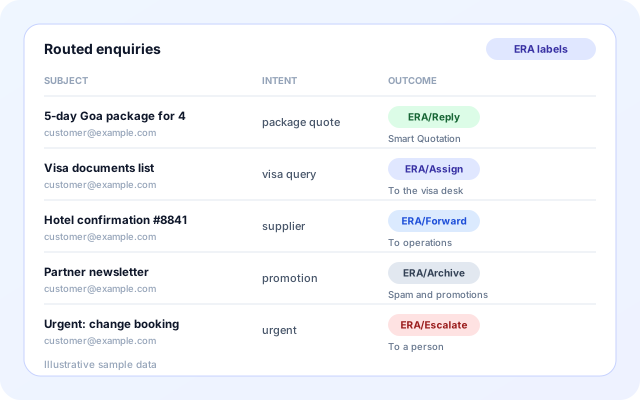
ERA reads the enquiry mailbox. Rules handle known mail first, such as VIP senders and spam keywords, and an LLM agent decides the rest. Each outcome is a mailbox label your team can filter on.
- Reply, assign, forward, archive or escalate to a person.
- Assign To and Forward To teams, by round robin or to everyone.
- Absence windows and fallback people keep seasonal peaks covered.
- Labels such as ERA/Assign and ERA/Escalate show what happened to each message.
Quote from your own prices
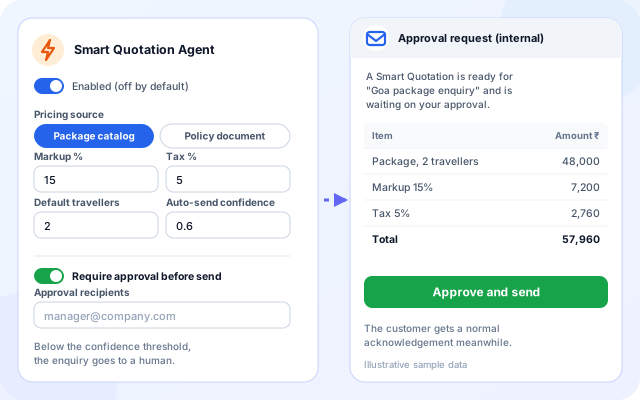
Smart Quotation is off until you enable it. It builds a priced reply from your package catalog or a rate-card policy, applies markup and tax, and can hold the quote for approval.
- Import packages from CSV or XLSX, or upload a JSON rate-card policy.
- Markup, tax, default travellers and an auto-send confidence threshold.
- With approval on, the customer gets an acknowledgement and your team gets the quote.
- A published itinerary from the library can be attached to the quote email.
Plan trips with search tools
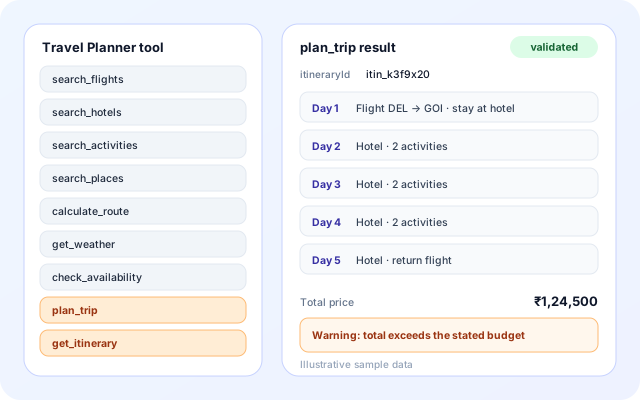
The Travel Planner tool gives any agent nine functions. plan_trip assembles outbound and return flights, a hotel and activities for each day, validates the plan and saves it. Today the search functions return built-in sample offers, so treat plans as drafts for your team to check.
- Pace of relaxed, moderate or packed sets how many activities fit each day.
- Validation flags a missing flight or hotel, wrong day count, budget overruns and overlapping items.
- Plans are saved with an itinerary ID and fetched again with get_itinerary.
- Add the tool to an agent in Agent Builder.
Answer on WhatsApp too
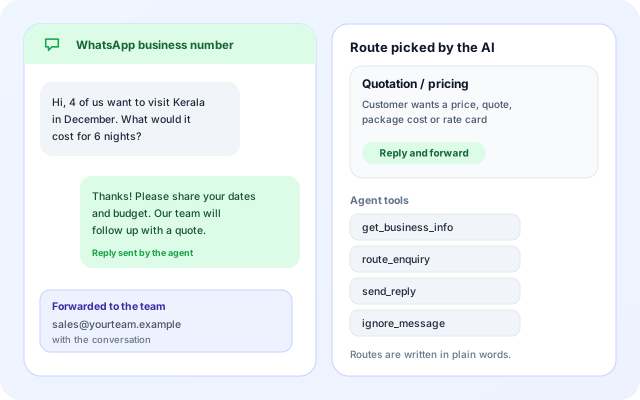
WRA connects WhatsApp Business numbers through the Meta WhatsApp Cloud API. An agent reads each message, picks a route from the descriptions you wrote, and replies, forwards by email or to another WhatsApp number, or both.
- Up to 10 numbers, each with its own access token.
- Presets include Quotation / pricing and Booking / appointment.
- The agent can only send to destinations saved in your setup, and replies once per message.
- Test & Messages shows the agent steps behind each decision.
From first enquiry to a followed-up quote
Each building block can be switched on by itself. Most agencies start with the inbox and add the rest.
- Connect the inbox: Use Gmail with an App Password or custom IMAP and SMTP, and add WhatsApp numbers if customers write there.
- Set up routing: Define teams and rules for email, or describe each WhatsApp route in plain words.
- Load your prices: Import packages in the Travel Library, or upload a rate-card policy as JSON.
- Turn on Smart Quotation: Choose catalog or rate card, set markup and tax, and decide whether quotes need approval.
- Follow up and review: Add the follow-up monitor, then review runs in Execution History and the ERA workspace.
Two paths through a travel desk
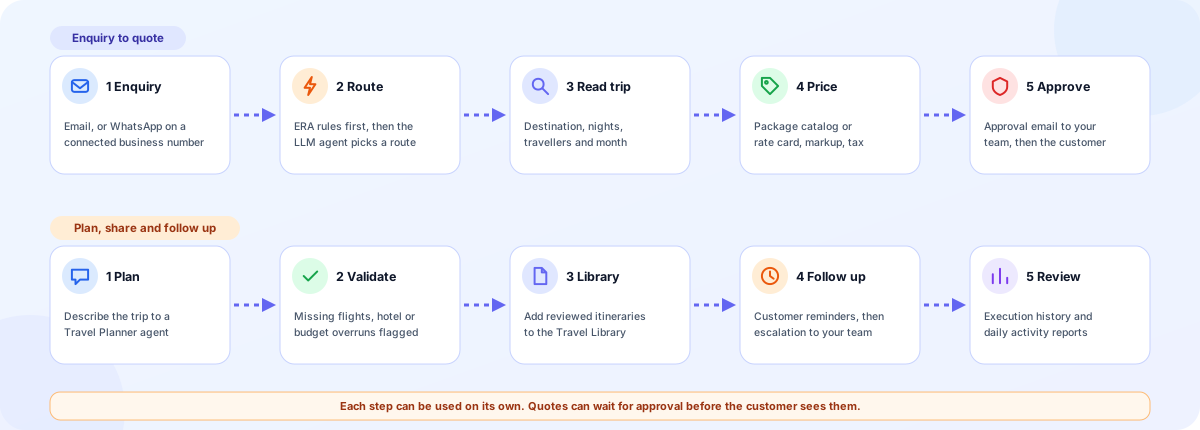
Building blocks for a travel desk
These are the apps, templates and agents behind the desk. Each is optional, and the Travel Library is shared by workflows inside your organization.
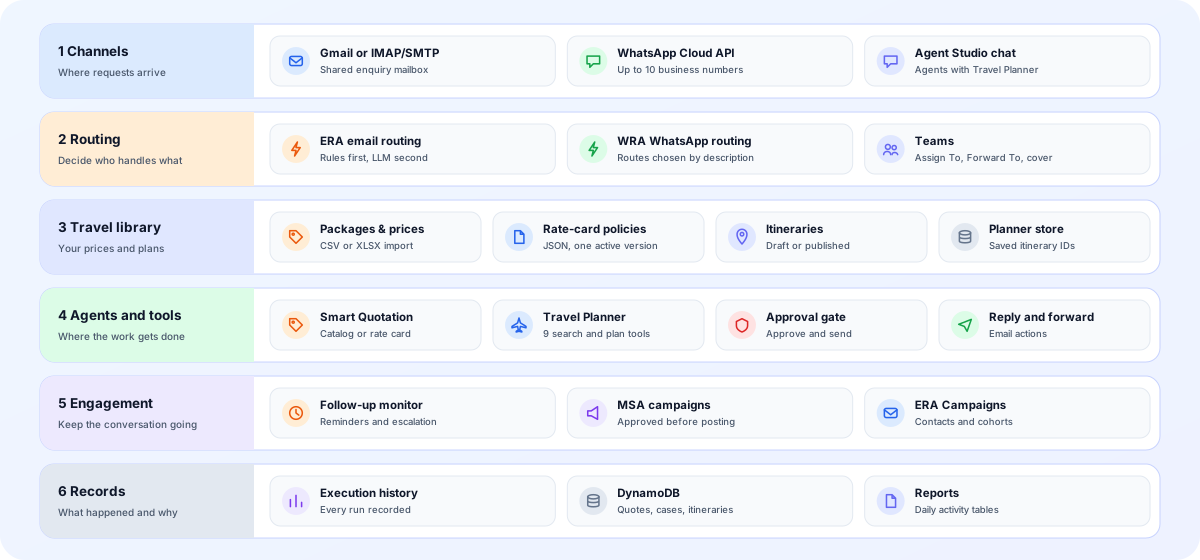
- Channels: Gmail with an App Password, custom IMAP and SMTP, and WhatsApp Business numbers through the Meta Cloud API.
- Routing: ERA routes email with rules and an LLM. WRA routes WhatsApp by route descriptions. Both can assign, forward or reply.
- Travel Library: Packages and prices, rate-card policies and itineraries, kept under Manage in the ERA workspace.
- Agents and tools: Smart Quotation prices a reply. The Travel Planner tool lets an agent search and plan a trip.
- Engagement: The follow-up monitor chases open threads. MSA drafts approved campaigns. ERA Campaigns sends email to contact cohorts.
- Records: Execution history, daily reports, and DynamoDB tables for quotes, open cases and itineraries.
Screens a travel team will use
Labels below are the ones shown in the ERA workspace.
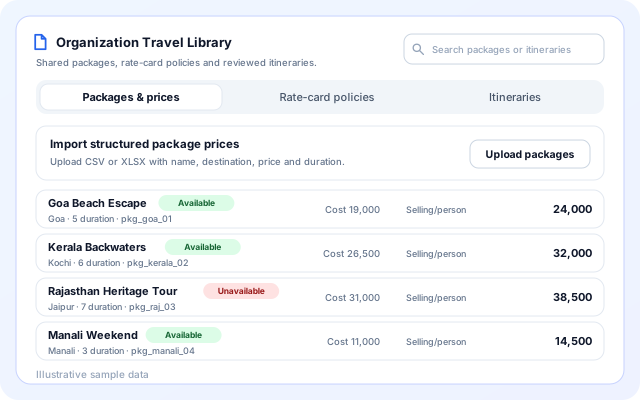
Travel Library: packages and prices
One shared place for the prices and plans your workflows quote from.
- Packages & prices: import CSV or XLSX, up to 6 MB, with an Available or Unavailable flag.
- Rate-card policies: a valid JSON policy becomes the active shared pricing source.
- Itineraries: import JSON as drafts, then Publish after review.
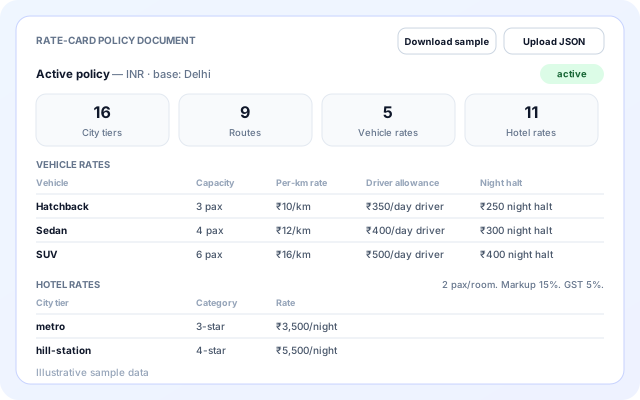
Rate-card policy
For road-trip style packages, prices are computed from rates instead of picked from a fixed list.
- City tiers, routes with distance, vehicle rates and hotel rates.
- Pilgrimage add-ons, seasonal surcharges, markup and GST.
- Download the sample policy, edit it and upload it again.
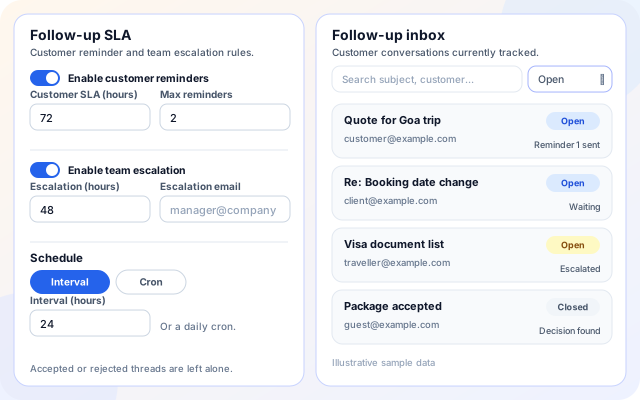
Follow-up SLA and inbox
Reminder and escalation timings next to the list of enquiries being tracked.
- Customer SLA in hours with a maximum number of reminders.
- Escalation SLA with an escalation email.
- Open, Closed and All views with search.
Scenarios for a travel agency
Each scenario uses building blocks that exist in the product today.
- Package enquiries by email: Classify the enquiry, price it from the catalog and send a quote after approval.
- Road-trip and pilgrimage quotes: The rate-card policy prices transport by distance and vehicle, hotel nights, guide fees and seasonal surcharges.
- WhatsApp price questions: A Quotation / pricing route replies, asks for dates and party size, and forwards the enquiry to your team.
- Visa and supplier mail: Assign visa questions to a desk and forward supplier confirmations to operations instead of leaving them in one inbox.
- Day-by-day itinerary drafts: Ask a Travel Planner agent for a plan, read the validation flags, then add reviewed itineraries to the library.
- Quiet quotes: Remind the customer, then escalate to your team. Threads already accepted or rejected are left alone.
Systems named in the code
These are the channels and tools the travel building blocks use today.
- Gmail (App Password)
- Any IMAP and SMTP mailbox
- Meta WhatsApp Cloud API
- CSV and XLSX package import
- JSON rate-card and itinerary import
- Calendar events
- CRM lookup and ticket tools
- LinkedIn, Facebook, Instagram and X (MSA)
- Organization AI Assistant
Your team keeps the decisions
The agents prepare and route. People approve and decide.
- Approval before a quote is sent: With approval required, the priced quote goes to your recipients first and the customer only gets an acknowledgement.
- Confidence threshold: When the quote confidence is below the threshold you set, the enquiry goes to a person.
- Prices come from rules: Catalog and rate-card pricing are computed by rules, not guessed by a model, and gaps in the enquiry are listed.
- Reviewed itineraries only: Imported itineraries start as drafts. Only published ones can be attached to quotations.
- WhatsApp stays inside your setup: The agent sends only to destinations saved in the configuration, replies once per message and falls back safely if the AI step fails.
What is in the travel toolkit
- Email routing: ERA with rules, an LLM, teams, availability and mailbox labels.
- WhatsApp routing: WRA with route descriptions, up to 10 numbers and a message log.
- Travel Library: Packages, rate-card policies and itineraries shared in the organization.
- Smart Quotation: Catalog or rate-card pricing, markup, tax and optional approval.
- Travel Planner tool: Nine functions for searching and planning, with validation and saved plans.
- Follow-up monitor: Customer reminders, team escalation and an interval or cron schedule.
- Campaigns: MSA posts and email with approval, and ERA Campaigns for contact cohorts.
- Reports and history: Daily activity tables, run history and a Sanity Test from the ERA workspace.
Frequently asked questions
Can the agent decide prices and availability for a trip?
No. It routes and drafts based on the rules and content you provide, but pricing, availability and booking decisions stay with your team. Review quotation emails before they go to customers.
How does it help with missed enquiries?
The follow-up monitor tracks open enquiries against the timings you set, sends reminders to staff, and escalates anything that waits too long, which reduces the chance that an enquiry is forgotten.
Do I need a special mailbox setup?
No. Connect Gmail with an app password or provide IMAP and SMTP details for your mail provider. The guided wizard walks you through the fields required and lets you review them before enabling.