What you will find
- Explanations of agents, the Agent Builder and how prompts, tools and knowledge fit together.
- Guidance on creating, running and scheduling workflows and reading execution history.
- Reference information about tools, apps and platform concepts.
- Searchable pages grouped into sections, with deep links to each page.
- Links from each guide into the matching screens of the platform.
How it works
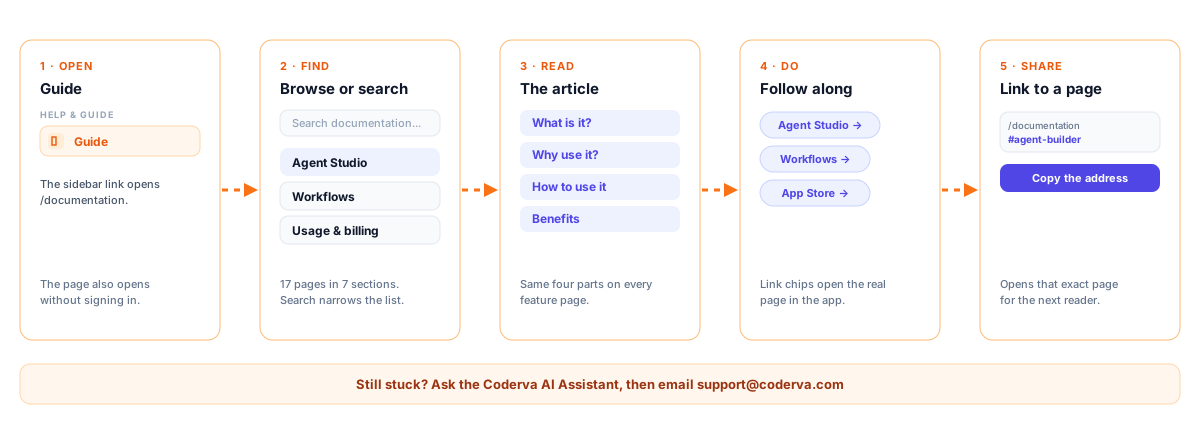
- Open Documentation from the Coderva navigation.
- Browse the wiki sections or look for the topic you need.
- Read the relevant page and follow the steps in the platform alongside it.
- Use the links in each guide to jump to the matching screen in the platform.
- Share a deep link to a page with a colleague using its page address.
Who it is for
Documentation serves everyone who touches the platform: administrators configuring an organization, builders designing agents, and operators watching workflows. New team members can use it to learn the vocabulary and structure, while experienced users can use it as a quick reference when they try a feature they have not used before. Keeping this knowledge in one wiki reduces repeated questions and makes onboarding more consistent across teams.
Key capabilities
- A single wiki covering the main platform areas.
- Task-oriented guidance that maps to actual screens and features.
- Links from guides into the related screens of the platform.
- A shared reference that keeps onboarding consistent when new people join your organization.
- Search across page titles and content.
- Search the wiki: Type a word and the Contents list narrows to the pages that mention it.
- One layout for every guide: Each page answers what it is, why to use it, how to use it and the benefits.
- Jump into the app: Link chips at the end of a guide open the matching page in the workspace.
What the documentation gives you
A map of the whole platform
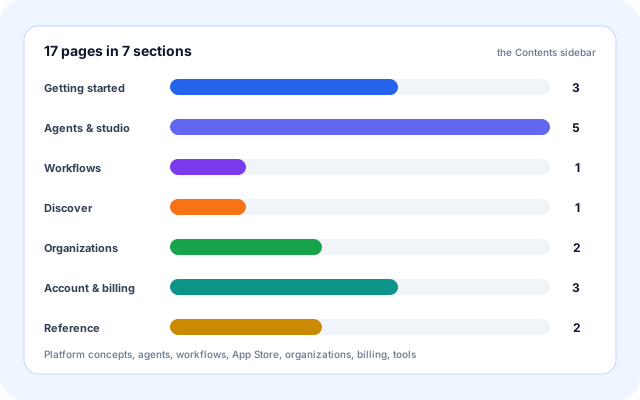
The Contents sidebar groups the guides by area, so a new teammate can see everything Coderva does without opening a single feature.
- Getting started: Platform overview, Workspace home and Quick start checklist.
- Agents & studio: Agent Studio, Agent Builder, Agent chat, Coderva AI Assistant and Org AI Assistant.
- Workflows, Discover (App Store), Organizations and Account & billing.
- Reference: Designer tools reference and Help & support.
Search that reads the whole page
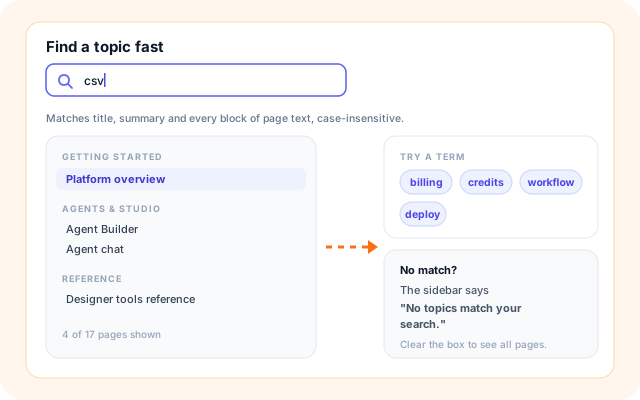
The Search documentation box matches the page title, its summary and all of the body text, not only the headings.
- The sidebar filters as you type, keeping only sections with a match.
- Matching ignores upper and lower case.
- It runs in the browser, so results appear immediately.
- If nothing matches, the sidebar says "No topics match your search."
The same shape on every page
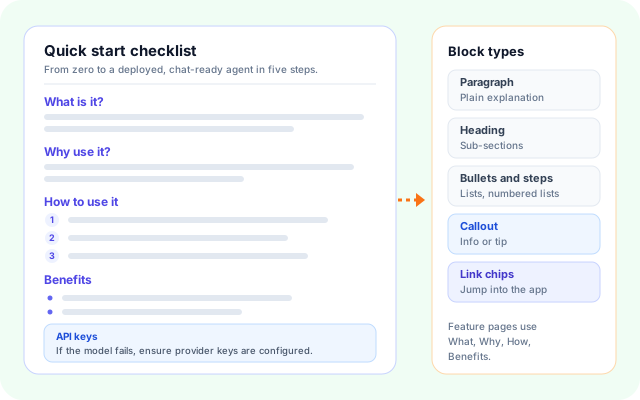
Feature guides follow one structure, so once you have read one you know where to look in the next.
- What is it? explains the feature in plain words.
- Why use it? gives the reason, and How to use it lists numbered steps.
- Benefits closes the page, with tips, callouts and sub-headings where needed.
- Link chips at the bottom take you to the real screen.
Links you can share
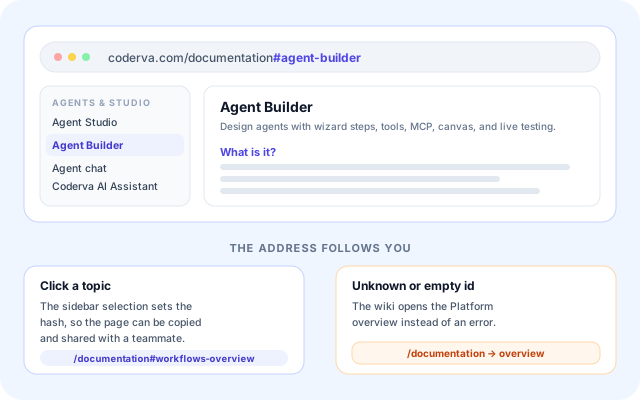
Selecting a topic puts its page id in the address, so you can send a teammate the exact page rather than the whole wiki.
- Open /documentation#agent-builder to land on the Agent Builder guide.
- The address updates as you click through the sidebar.
- An unknown or empty id opens the Platform overview.
- Help & support itself points readers to these hash links.
From a question to an answer
The wiki needs no setup. Open it, find the topic, read it, and follow the steps in the product.
- Open the Guide: Use Guide under Help & Guide in the sidebar, or go to /documentation. The page also opens without signing in.
- Browse the Contents: Pick a topic from the sidebar. The open page is highlighted with a chevron.
- Or search: Type in Search documentation... to keep only the pages that mention your term.
- Read the article: Work through What is it, Why use it, How to use it and Benefits, plus any tip or callout.
- Follow along and share: Use the link chips to open the feature, and copy the #page-id address to share the page.
Open, find, read, do, share
How the wiki is built
The documentation is typed content bundled with the web app. A single React page renders the sidebar and the article, search runs in the browser, and the address hash chooses the page.
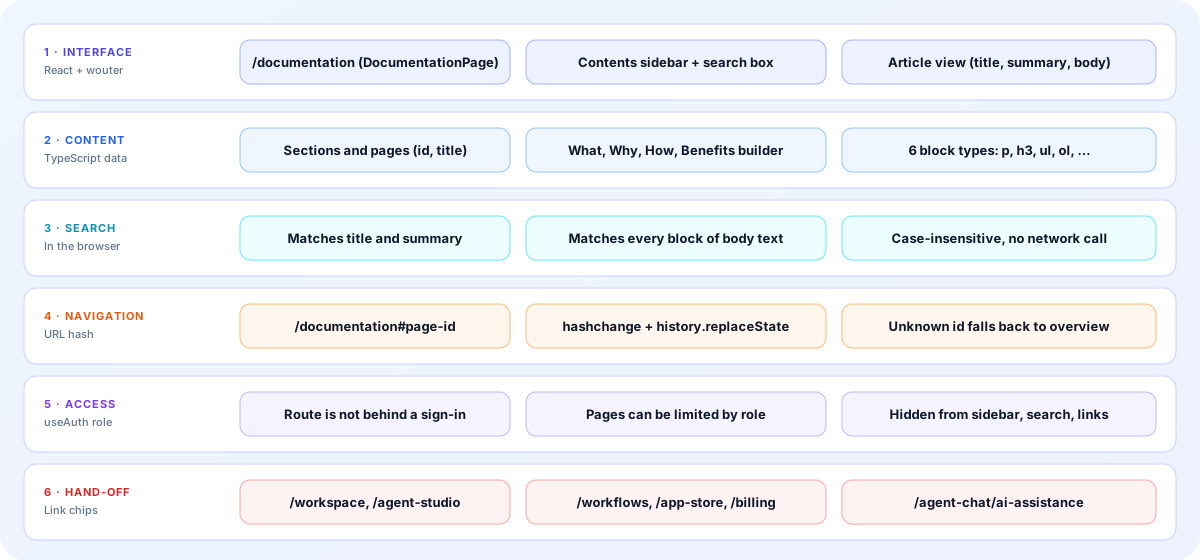
- Interface: DocumentationPage at /documentation shows a Search documentation box, a Contents sidebar and an article panel. The sidebar stacks above the article on narrow screens.
- Content: Each page has an id, title, summary and section. Pages are built with a helper that lays out What is it, Why use it, How to use it and Benefits.
- Block types: Articles are made of paragraphs, sub-headings, bullet lists, numbered lists, info or tip callouts and link chips.
- Search: Search checks the title, summary and the text of every block in the browser. No network request is made.
- Navigation: The page id lives in the URL hash. Clicking a topic updates it, and a hash change opens the matching page, falling back to the overview.
- Access and hand-off: The route is not behind sign-in. Pages can be limited by role and are then left out of the sidebar, search and links. Link chips open workspace routes such as /agent-studio and /workflows.
The screens you will use
Mock-ups use real page titles, steps and labels from the wiki.
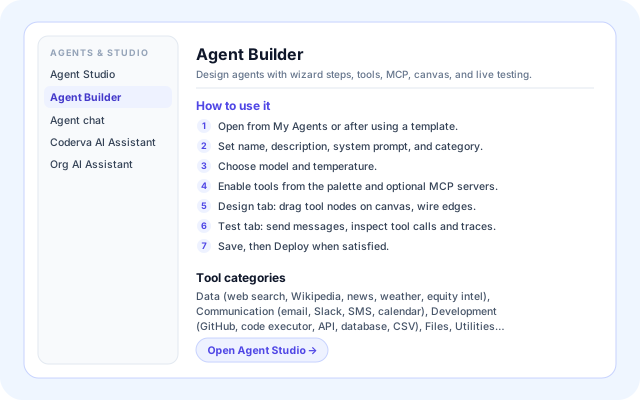
Agent Builder guide
A typical feature guide: a summary, numbered steps for the wizard, canvas and Test tab, and a link to Agent Studio.
- Seven steps from opening the builder to Deploy.
- A Tool categories sub-heading lists what can be attached.
- The Agent Builder item is highlighted in the sidebar.
Designer tools reference
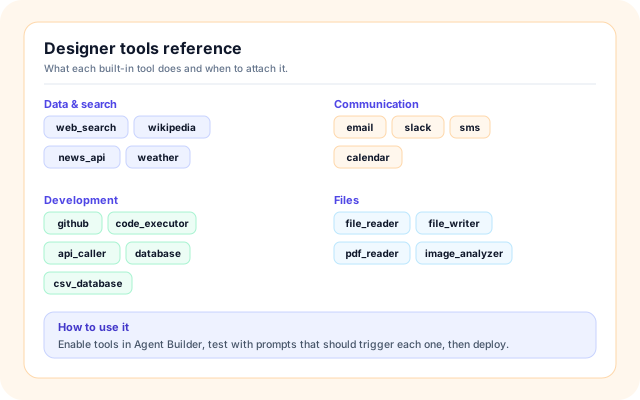
A reference page that groups built-in tool IDs by category, with a short How to use it for choosing and testing them.
- Categories include Data & search, Communication, Development and Files.
- IDs such as web_search, github and csv_database.
- Test each tool in the Agent Builder Test panel before deploying.
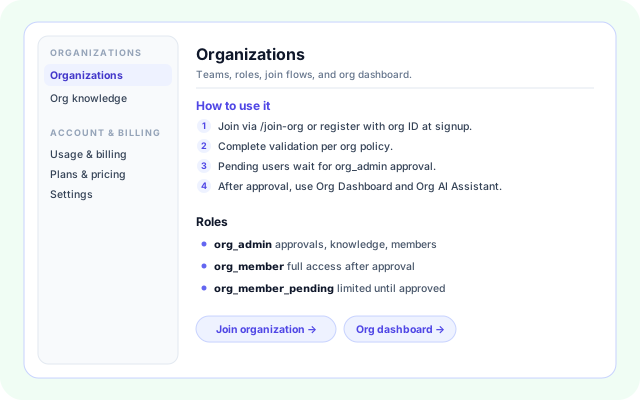
Organizations guide
Steps for joining and approval, a Roles list and link chips to the join page and the Org dashboard.
- Roles: org_admin, org_member and org_member_pending.
- The sidebar shows neighbouring topics such as Org knowledge.
- Link chips open Join organization and Org dashboard.
What people use the wiki for
Each card maps to pages that exist in the wiki today.
- Get a first agent live: Quick start checklist takes you from sign-in to a template agent, a deployment and a first chat in five steps.
- Learn to build: Agent Studio and Agent Builder explain templates, drafts, deployments, tools, MCP, the canvas and the Test panel.
- Chain agents together: The Workflows guide shows how to build a composite workflow from deployed agents, run it and schedule it.
- Set up a team: Organizations and Org knowledge cover joining, roles, approvals and the sources behind the Org AI Assistant.
- Understand credits: Usage & billing, Plans & pricing and Settings explain the credit balance, usage events, plans and your account options.
- Pick the right tool: The Designer tools reference lists built-in tool IDs by category so you attach the right ones.
What the guides explain
Only systems named in the wiki pages are listed.
- Gemini
- Groq
- OpenAI
- Perplexity
- MCP servers
- GitHub
- Slack
- SMS
- Calendar
- CSV and PDF files
- Wikipedia
- News API
- Org knowledge sources
Everything in the wiki
- Search documentation: A search box above the sidebar that filters pages by title, summary and body text.
- Contents sidebar: Sections and topics in one list, with the open page highlighted and sticky on wide screens.
- Hash deep links: Open /documentation#page-id to land on a specific guide, and copy the address to share it.
- Numbered how-to steps: How to use it lists the actions in order, using the real tab and button names.
- Tips and info callouts: Short highlighted notes, such as the API keys reminder in Quick start checklist.
- Link chips: Jump from a guide to Workspace Home, Agent Studio, Workflows, App Store, Billing and more.
- Personal greeting: Signed-in users see Welcome back with their first name; visitors see Coderva Documentation.
- Layered help: Help & support points to this wiki first, then the Coderva AI Assistant, then email support.
Frequently asked questions
Is the documentation different from Agent Studio?
Yes. Documentation is a reference for how the platform works and how to configure it. Agent Studio is the hands-on environment where you build and test agents using that knowledge.
Where should a new team member start?
Begin with the overview page, then the pages on agents and workflows, and try Agent Studio with a template. Once comfortable, read the tools reference to see what your agents can use.
Does the documentation cover individual apps?
It covers the platform concepts and setup that apps rely on. For app-specific information, such as trading or email management, also review the app pages and the guided setup inside each app.