Use cases
- Answer common questions from a knowledge base you provide.
- Create a ticket in your own CRM through the ERA Create CRM Ticket tool.
- Draft and send email replies in a consistent tone.
- Route messages to the right person when the agent cannot resolve them.
- Follow up on unanswered email threads with the ERA follow-up monitor.
- Summarize long email threads so a colleague can pick up a case without reading everything.
Apps and templates that apply
- Customer support agent: a template in Agent Studio to start from.
- Agent Builder: to adjust prompts and choose tools.
- ERA email routing and follow-up: for shared inbox triage and reminders.
- WhatsApp Routing Agent: answers and routes WhatsApp messages by intent.
How it works
- Open Agent Studio, go to the templates tab and choose the customer support agent.
- Upload your help articles and policies as knowledge in agent chat or Organization Knowledge.
- In the Agent Builder, choose the tools the agent may use and describe when each should be used.
- Test with real customer questions, including difficult ones, and refine the prompts.
- Deploy the agent and use workflows for scheduled follow-ups and monitoring.
Who it is for
This domain suits support teams in software, services and retail that handle recurring questions across email and tickets. The agent is strongest on well-documented topics, so keep your knowledge base current. Sensitive, complex or emotional cases should be escalated to a person, and you should review conversations regularly to catch gaps. When the agent struggles with a topic, add or improve the relevant article in the knowledge base, which is usually the quickest way to raise answer quality.
- Route by intent: Describe each enquiry type in plain words. The agent picks the route that fits and acts on it.
- Answer from your files: The Knowledge Base Agent searches uploaded documents and names the source it used.
- Hand off to people: Forward by email or WhatsApp, assign to a team, escalate to a human or create a ticket through your CRM API.
What support teams get
Start from a Customer Support Agent template
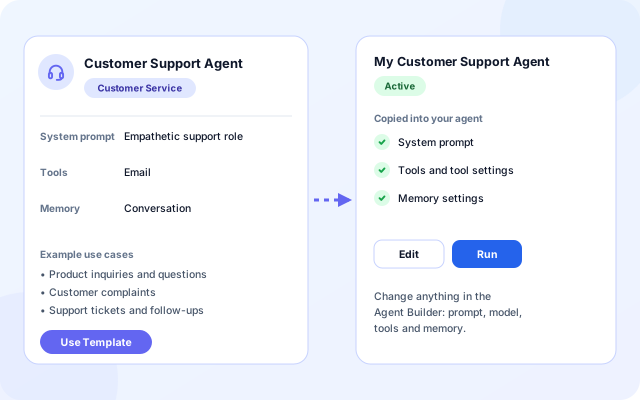
The Agent Studio template library includes a Customer Support Agent in the Customer Service category. Use Template copies its prompt, tools and memory into your own agent, which you then change in the Agent Builder.
- The prompt asks for empathetic answers, a clear next step and escalation of complex issues to a human.
- It starts with the Email tool and conversation memory.
- Add tools such as Slack, SMS, Calendar, Web Search or an API Caller for your own helpdesk API.
- Test with visible thoughts and tool calls, then deploy to its own URL.
Answer from your own documents
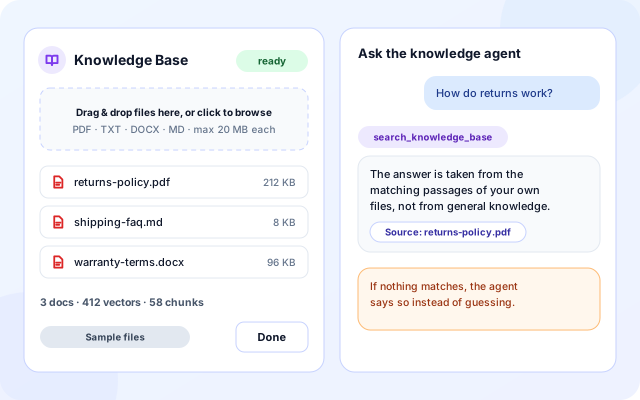
The Knowledge Base Agent searches files you upload and answers from them. Organization admins can also build an Organization Knowledge Base for the organization AI Assistant.
- Upload PDF, TXT, DOCX or MD files, up to 20 MB each, from the Knowledge Base panel in agent chat.
- The agent calls search_knowledge_base before it answers and names the source document.
- If nothing relevant is indexed it says so instead of guessing.
- Organization Knowledge can index PDF or DOCX files, wiki pages, Confluence, web URLs and databases.
Route WhatsApp enquiries by intent
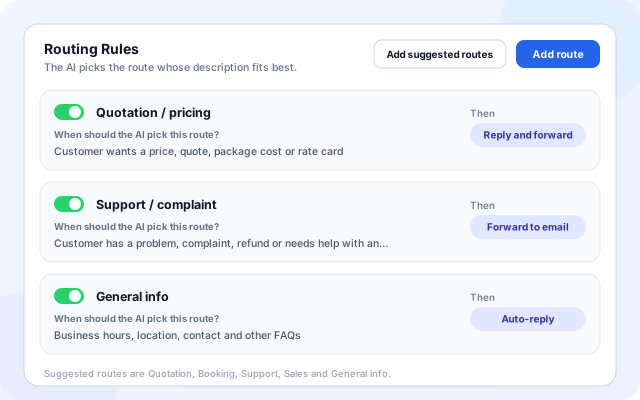
The WhatsApp Routing Agent reads each message sent to your business number, matches it to the route description you wrote, then auto-replies, forwards or both. Routing is LLM-only, with no keyword rules.
- Add suggested routes for Quotation, Booking, Support, Sales and General info, or write your own, up to 25.
- Each route has one action: Auto-reply, Forward to email, Forward to WhatsApp number or Reply and forward.
- A fallback action covers messages that match no route.
- Replies use only your business information, in the customer language, English or Hindi.
Hand off to a person with context
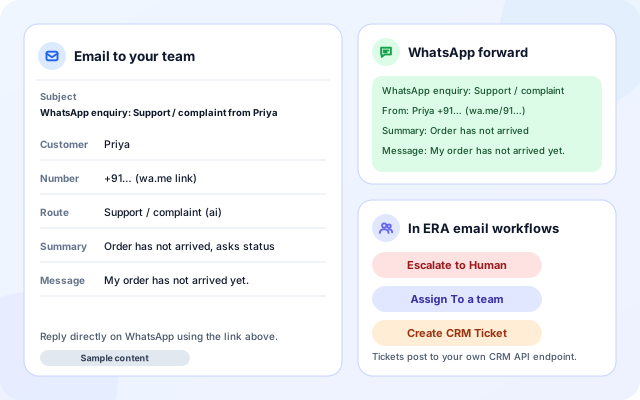
When a case needs judgement, the right person gets the facts. WhatsApp forwards arrive by email or on another WhatsApp number. ERA email workflows can assign to a team, escalate to a human or create a ticket.
- A forward carries the customer, number, route, summary and original message.
- Forwarded emails are sent from noreply@coderva.com, or from your own mailbox over SMTP.
- The customer can receive an acknowledgement after a forward, and a failed WhatsApp forward falls back to email.
- ERA tools include Assign To, Forward To, Escalate to Human and Create CRM Ticket.
From first message to a working support desk
The building blocks are independent. Start with the channel your customers use most.
- Choose a channel: Connect a shared inbox with ERA, a WhatsApp Business number with the WhatsApp Routing Agent, or deploy an agent for chat.
- Describe how requests are handled: Write ERA routing rules, or WhatsApp route descriptions of up to 300 characters, and your business information.
- Add knowledge: Write business information for WhatsApp replies, upload files for the Knowledge Base Agent, or build Organization Knowledge.
- Set hand-offs and fallback: Choose forward destinations, the escalation email and what happens when no route matches.
- Test, activate, review: Test routing sends nothing. Activate, then review Recent messages and Execution History.
A support request, from first message to review
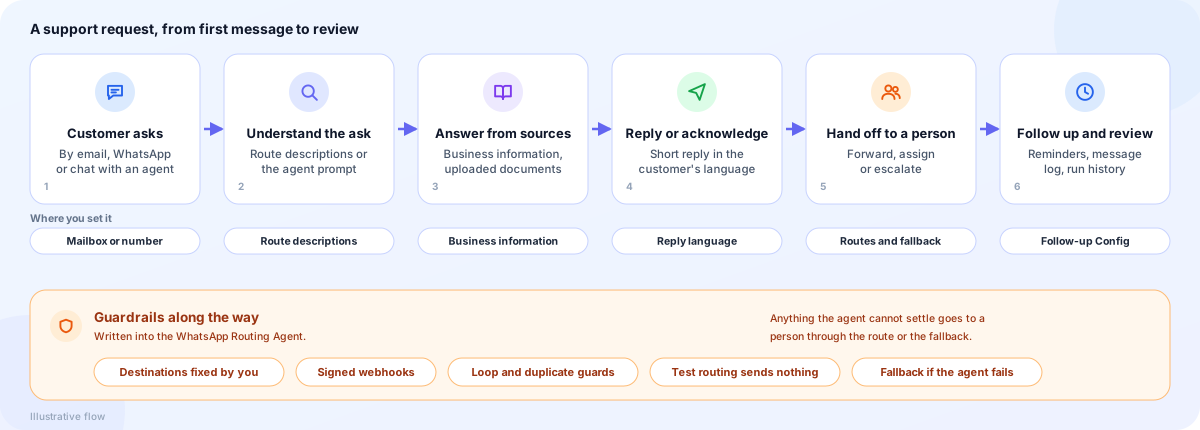
Building blocks for customer support
Channels bring messages in, routing and agents decide, knowledge supplies answers, tools and people act, and records let you review.
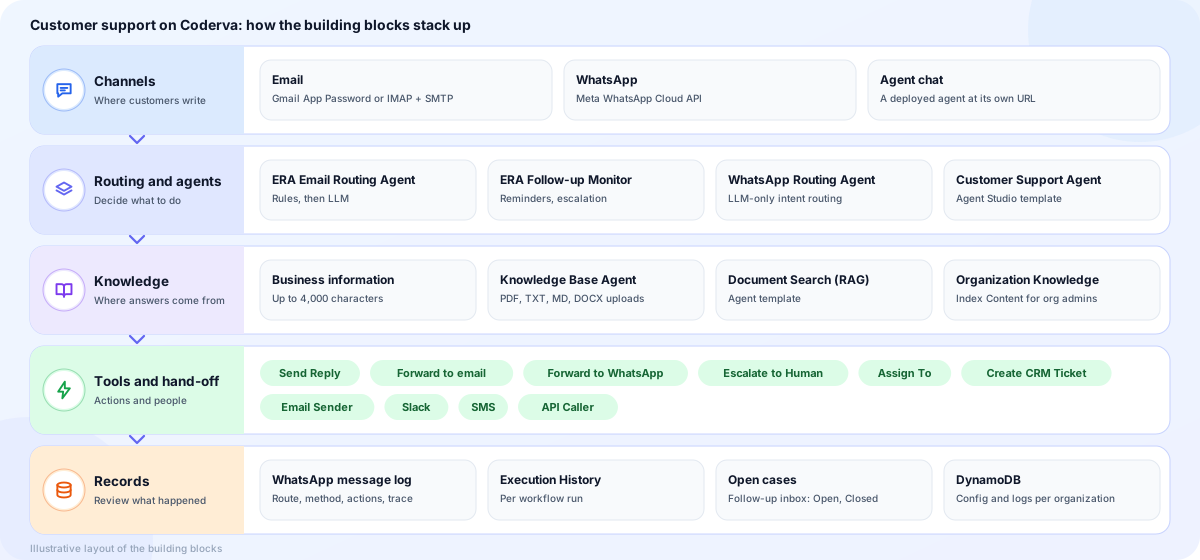
- Channels: Email through Gmail or IMAP and SMTP, WhatsApp through the Meta WhatsApp Cloud API, and agent chat at a deployed URL.
- Routing and agents: ERA Email Routing Agent and Follow-up Monitor, the WhatsApp Routing Agent, and the Customer Support Agent template.
- Knowledge: Business information for WhatsApp, the Knowledge Base Agent, the Document Search (RAG) template and Organization Knowledge.
- Tools and hand-off: Send Reply, forwards, Escalate to Human, Assign To, Create CRM Ticket, Email Sender, Slack, SMS and an API Caller.
- Records: A WhatsApp message log, Execution History, open follow-up cases, and DynamoDB storage for configuration and logs.
Screens you will use
The template library, the WhatsApp test panel and the follow-up settings cover the main setup steps.
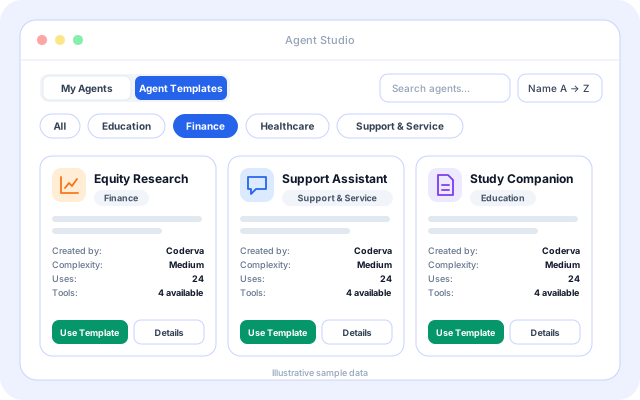
Agent Templates tab
Where the Customer Support Agent template lives in Agent Studio.
- Search, sort and filter by category chips.
- Use Template and Details buttons on each card.
- Details lists tools, required tools and example use cases.
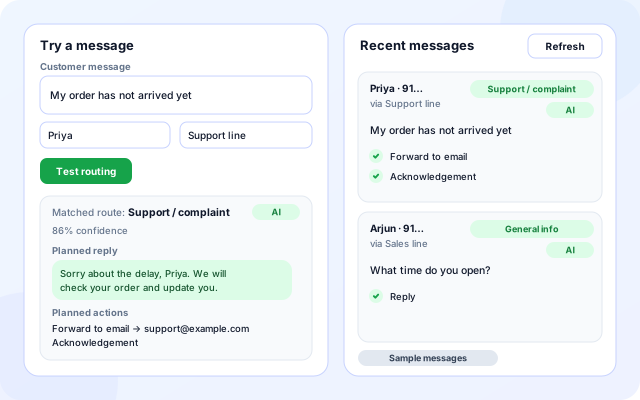
Test a WhatsApp message
Try a customer message before you activate, and read recent messages afterwards.
- Test routing uses your last saved settings and sends nothing.
- The result shows the matched route, an AI, Fallback or No action badge, confidence, planned reply and planned actions.
- Recent messages show the route, reply, actions and agent trace, with a Refresh button.
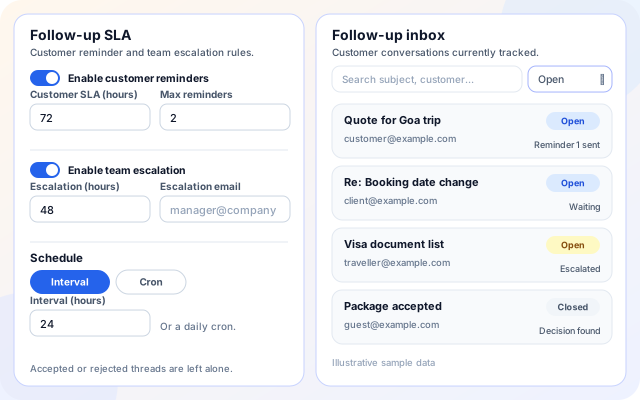
Follow-up settings and inbox
Keep customers from waiting in silence on the email side.
- Customer SLA in hours with a maximum number of reminders.
- Escalation SLA in hours with an escalation email.
- Search the follow-up inbox and filter Open, Closed or All cases.
Support scenarios teams set up first
Each one is a configuration of the same building blocks.
- Order and delivery complaints: A Support / complaint route can ask for an order reference, say the team will respond, and forward the case to your support email.
- Hours, location and FAQs: A General info route auto-replies from the business information you wrote and says the team will confirm anything it does not cover.
- Policy questions from documents: The Knowledge Base Agent answers from uploaded policies and names the source file.
- Shared support inbox: ERA assigns each message to a team, archives noise, and can create a ticket through your CRM API.
- Bookings and appointment requests: A Booking route asks for a preferred date, time and contact details without confirming availability.
- Customers left waiting: The follow-up monitor reminds the customer, then escalates to a manager when your own team has not replied.
Systems named in the code
These channels and tools are available for support setups today.
- Meta WhatsApp Cloud API
- Gmail (App Password)
- Any IMAP and SMTP mailbox
- Your CRM API (Create CRM Ticket, CRM Lookup)
- Email Sender (AWS SES)
- Slack
- SMS
- API Caller (your own helpdesk API)
- Confluence, wiki and web sources (Organization Knowledge)
- Groq GPT-OSS models
Guardrails in the WhatsApp Routing Agent
The agent classifies and routes. What it can do, and where messages can go, is set by you.
- Destinations are fixed: Tools only act on the emails and numbers you saved. The model never supplies a destination.
- Customer text is data: The agent prompt treats each message as untrusted data and ignores instructions written inside it.
- Signed webhooks: Inbound calls are checked against a verify token and the X-Hub-Signature-256 signature for your number.
- Loop and duplicate guards: Repeated deliveries are ignored, and a sender who triggers 5 automatic replies or 20 messages in 10 minutes is skipped.
- Fallback if the agent fails: If the agent errors, times out or does not route, the fallback you configured is applied.
- Replies from your facts only: AI replies use only the business information you wrote and stay short, or you can write fixed reply text per route.
What is in the support toolkit
- Customer Support Agent template: A starting prompt, the Email tool and conversation memory, ready to edit in the Agent Builder.
- WhatsApp Routing Agent: Up to 10 numbers and 25 routes, with a fallback, Test routing and a message log.
- ERA email routing: Rules first, LLM second, with assign, forward, escalate, archive and CRM ticket tools.
- Knowledge Base Agent: Upload files, search them semantically and answer with named sources.
- Follow-up monitor: Customer reminders and team escalation for threads that go quiet.
- Organization AI Assistant: Organization admins can give staff an assistant that searches the Organization Knowledge Base and answers policy questions.
- Test before live: Test routing sends nothing, and ERA offers Run Backtest and a health check.
- Review what happened: Recent messages, Execution History and daily activity reports.
Frequently asked questions
Where does the agent get its answers?
From the instructions you give it and the knowledge you upload, such as help articles and policies. Keeping that material accurate and current is the best way to keep answers reliable.
Can the agent hand a case to a person?
Yes. You can design the agent to route or escalate cases it cannot resolve, using email tools and the routing agents, so that complex or sensitive issues reach a human on your team.
Does it work with email as well as tickets?
Yes. The ERA routing template triages a shared inbox, the WhatsApp Routing Agent handles WhatsApp messages, and ERA can create a ticket in your own CRM, so you can cover several channels.