Use cases
- Practice interview answers with the Mock Interview agent and refine them over several attempts.
- Build small agents and workflows to show practical skills.
- Join the internship program to work on real agent and workflow projects.
- Use the documentation as a reference while working on projects.
Apps and templates that apply
- Mock Interview: a workflow template for interview practice.
- Agent Studio and Agent Builder: hands-on environments for building agents.
- Documentation: reference material that supports project work.
- Internship: a program for working on real projects.
How it works
- Sign in and open Mock Interview.
- Rehearse answers for the role you want and review the feedback.
- Practice again and compare the feedback you get each time.
- Open Agent Studio and build a small agent, such as one that answers questions for a club or a course.
- Keep the project as an example of your work, and ask about the internship program if you want to work on real projects.
Who it is for
This domain suits students, graduates and career changers, as well as colleges and training providers that want to give learners hands-on exposure to modern AI tooling. Practice and projects improve readiness, but they do not guarantee a particular job outcome, so combine them with your own research and effort. Building a few small agents and keeping them as examples of your work can also help you explain your skills to future employers or teachers.
- Scored interview practice: Every answer gets a score out of 10 with relevance, completeness, clarity and depth labels.
- Build real agents: Agent Studio and the Agent Builder, with a guided Wizard for first-time builders.
- Internship application: A short form, then a status of In Review, Approved or Not Selected.
What each building block gives a learner
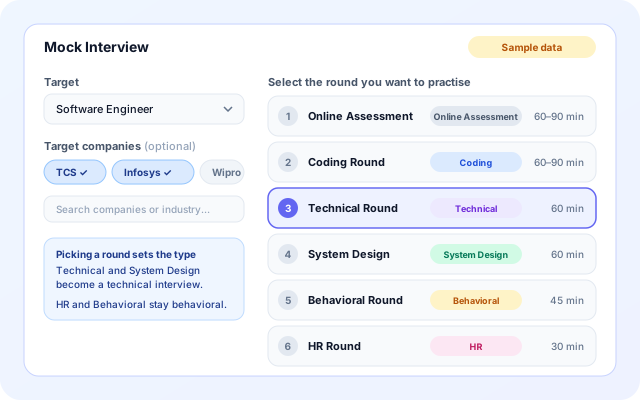
Practise for a specific role, company and round
Mock Interview starts from the job you want. Pick a role, optionally add target companies, choose the round you want to rehearse and pick who interviews you.
- 36 roles and 51 Indian companies, from IT services firms to startups.
- A round list per role. Software Engineer runs from Online Assessment to HR.
- The round sets the interview type: technical, behavioral or mixed.
- Interviewer: animated Tom, Alex, Sarah or Maya, or your own uploaded video panelist.
Get feedback on every answer
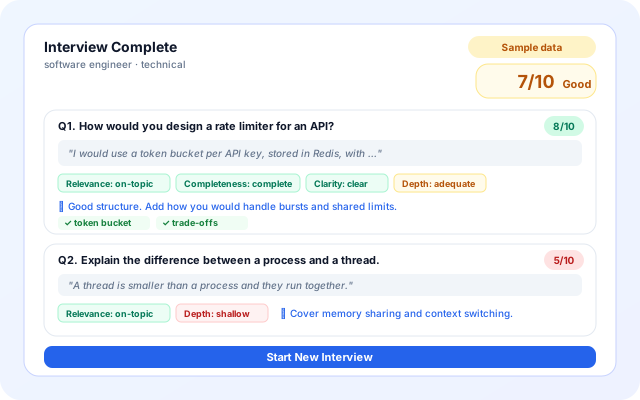
Each answer is scored by an AI model against the signals a good answer should cover. The interviewer can probe, reframe a question or answer your clarifying questions, so it feels like a conversation.
- Score out of 10, plus Relevance, Completeness, Clarity and Depth labels.
- A short feedback line and the signals your answer covered.
- An overall grade: Excellent, Good, Fair or Needs Work, with a per-question breakdown.
- The page shows results at the end of a session and does not keep past sessions, so note your scores.
Follow a campus-to-career journey
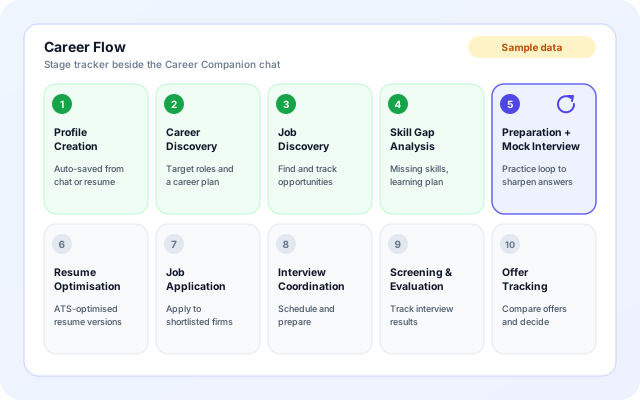
The Career Companion agent guides students and graduates through ten stages in one chat, with a Career Flow tracker beside it. It saves your profile, skill gaps, jobs, mock interviews and offers as you go.
- Parse a resume PDF into a career profile and career plan.
- Skill gap analysis with a learning plan, and question sets for preparation.
- ATS-focused resume versions, job tracking, interview scheduling and offer tracking.
- It answers first and saves afterwards, so you are never blocked by a profile form.
Build agents and keep them as project work
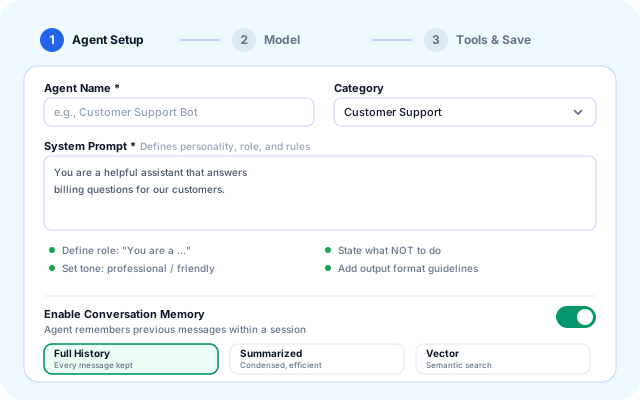
Learners build on the same Agent Studio and Agent Builder that professionals use. The Wizard walks through Agent Setup, Model and Tools & Save, and the Education tools cover lectures and college details.
- Four Education tools: Audio Transcription, College Info, Current Session and Lectures.
- Lectures stores a summary, key notes, key concepts, multiple-choice quiz questions and assignments.
- Application Tracker stores internship and vocational applications with status and links.
- The Documentation pages explain agents, tools and workflows step by step.
From first practice to a finished project
Learners can do these in any order. Colleges add an organization when they want to bring a whole group on.
- Pick a target: Open Mock Interview, choose a role or a company, select a round and an interviewer, then press Start Interview.
- Answer by voice or text: Use the microphone where your browser supports it, or type. Skip a question, or switch to Auto mode to go hands-free.
- Read the results: See your score, the four feedback labels, tips and signals for each answer, then Start New Interview to try again.
- Build an agent: Open Agent Studio, use a template or start from scratch, and build a small agent such as a course or club helper.
- Apply or onboard: Submit the internship form at /internship, or ask your college to create an organization and share the join rules.
Practice, projects, applications and campus rollout
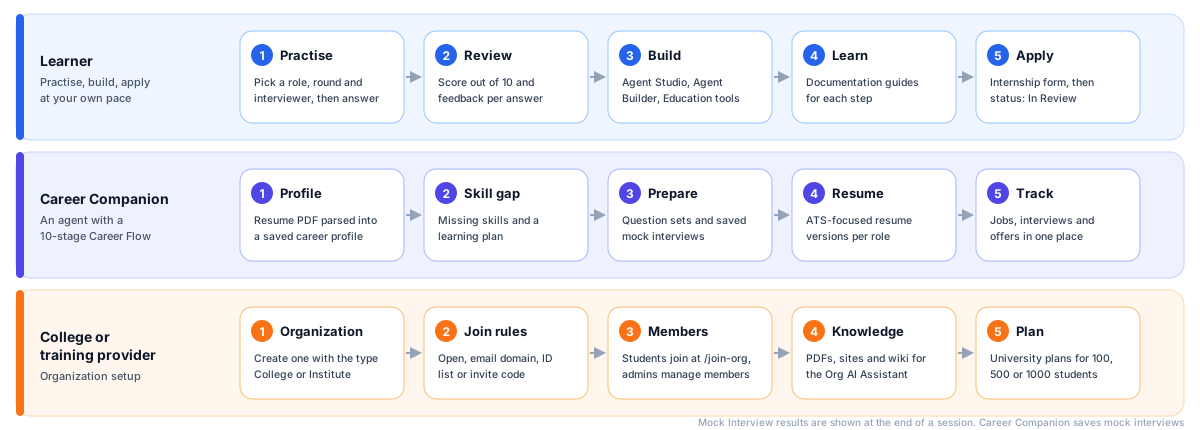
The building blocks behind education and careers
Learner pages sit on top of agents and tools. Mock Interview has its own interview engine. Colleges use organization features, and learner data is stored in DynamoDB tables.
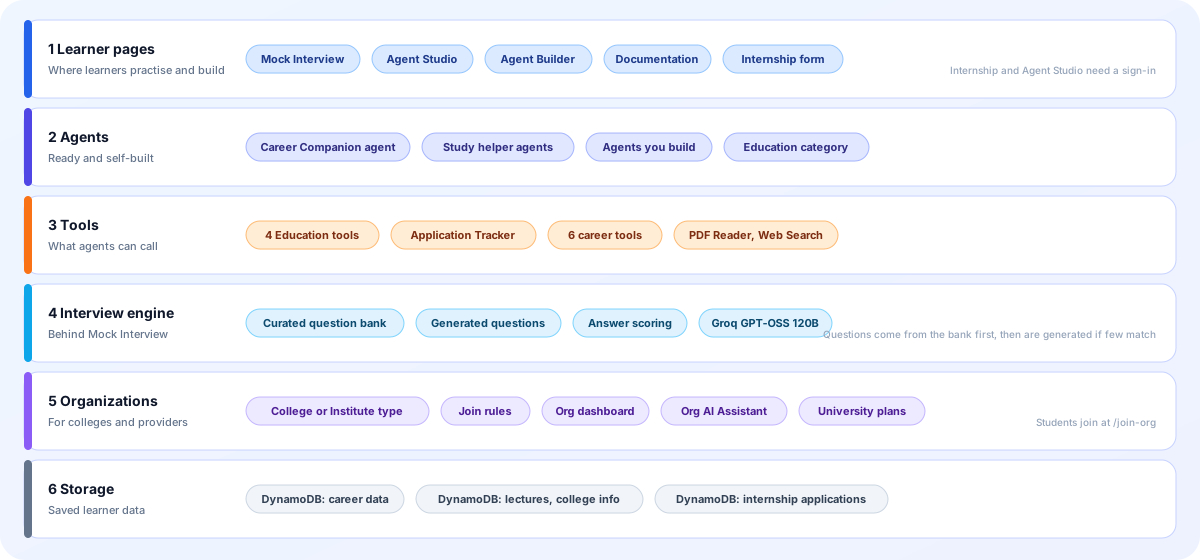
- Learner pages: Mock Interview, Agent Studio, Agent Builder, Documentation and the Internship application form. Agent Studio and the form need a sign-in.
- Agents: The Career Companion template (Education category), study helpers built with the Education tools, and any other agent a learner builds.
- Tools: Education tools, the Application Tracker, and for Career Companion six career tools plus PDF Reader and Web Search for live jobs and salaries.
- Interview engine: A curated question bank first, with generated questions added when few match. An AI model scores answers and writes clarification replies.
- Organizations: Create an organization of type College or Institute, set join rules, approve members, add knowledge for the Org AI Assistant and choose a university plan.
- Storage: DynamoDB tables hold career data, lectures, college info and internship applications. Staff review internship applications in an admin page.
Screens you will use
Mock-ups with sample data, drawn from the real labels, buttons and layout.
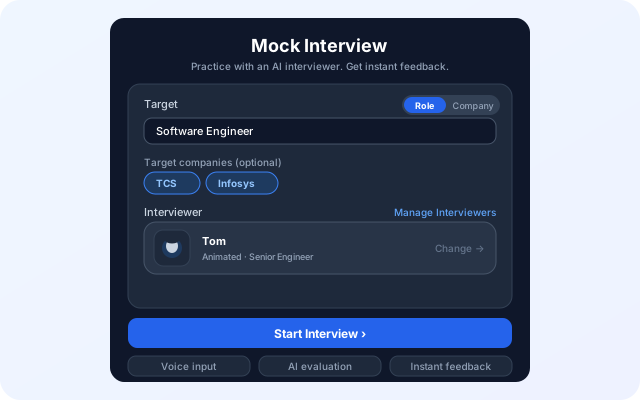
Mock Interview setup
A single page to set up a session: what you are practising for, who interviews you and when to begin.
- Role or Company toggle, with search for both.
- Optional target companies and a round picker for the chosen role.
- Interviewer card with Manage Interviewers and Change.
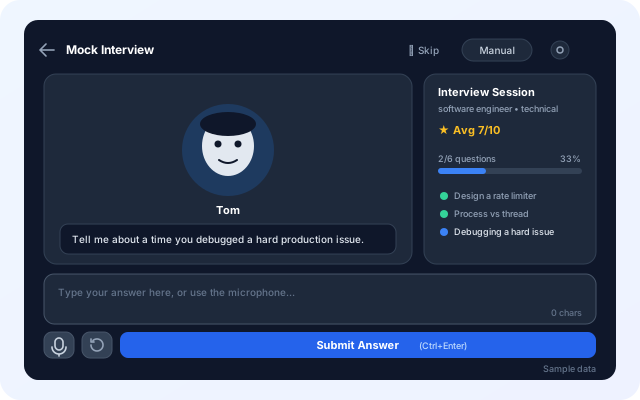
The interview room
The interviewer asks a question aloud and on screen. You answer by typing or speaking and submit with Submit Answer.
- Skip, a Manual or Auto toggle and a session info dialog.
- An Interview Session panel with average score and progress.
- An optional camera self-view for rehearsing eye contact.
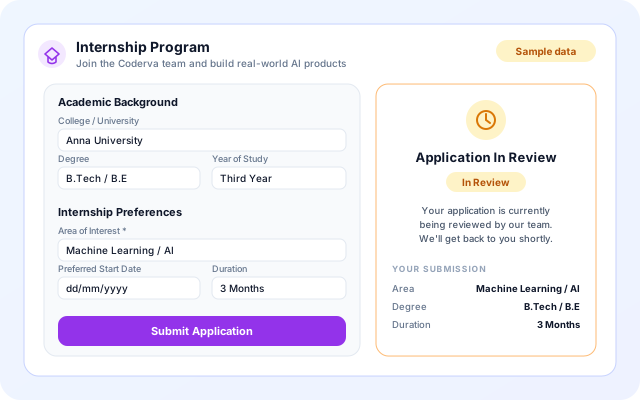
Internship application
A one-page form for the Coderva internship. After you submit, the same page shows the status of your application.
- Sections: Personal Information, Academic Background, Internship Preferences, Portfolio & Links and a motivation note.
- Ten areas of interest and durations from 1 Month to 6 Months or Flexible.
- One application per account, with an email when it is approved or not selected.
Education and career scenarios
Concrete ways learners, faculty and placement teams use the building blocks.
- Interview prep before placements: Practise for a target company and role, round by round, and see which answers score low.
- Rehearse one weak round: Pick only the HR, Behavioral or System Design round and repeat it until the feedback improves.
- Lecture notes and quizzes: Build an agent with Audio Transcription and Lectures to turn a lecture transcript into notes, key concepts, quiz questions and assignments you can search later.
- Track applications in one place: Use the Application Tracker tool, or the Career Companion job tracker, to keep jobs, internships and statuses together.
- A college rollout: Create a College organization, choose open access, an email domain, an ID list or an invite code, and give students the shared Org AI Assistant.
- Apply for the internship: Submit the form at /internship and follow the status. The Coderva team reviews every application.
Systems named in the code
Only services the education building blocks actually use today.
- Groq GPT-OSS 120B (interviewer and career agent)
- Browser voice input and spoken questions
- Browser camera (optional self-view)
- Resume PDF parsing
- Web Search (live jobs and salaries)
- AWS Transcribe (Audio Transcription)
- Amazon S3 (audio files)
- Amazon DynamoDB
- Email notifications for internship decisions
- Razorpay (INR billing for plans)
Clear limits and controlled access
What the code enforces today, and what practice cannot promise.
- Practice, not a promise: Scores are AI estimates for rehearsal. They do not predict an interview result, an internship or a job offer.
- Join rules for organizations: A college can use open access, an email domain, an ID pattern, an ID list or an invite code, and admins manage members.
- Role-based access: Organizations have admin, edit and view roles, and members can be pending until approved. Only staff can see internship applications.
- Learner data stays scoped: Career Companion records are keyed to your user account. Lecture, college and session data is scoped to each agent deployment so two agents never see each other's notes.
- One internship application per account: A second submission from the same account is rejected, and you see the status of the first one instead.
- Sessions are not stored in Mock Interview: The Mock Interview page keeps results on screen only. Use Career Companion if you want mock interviews saved.
What is included
- Role and company practice: 36 roles, 51 companies and role-specific round lists.
- Voice or text answers: A microphone where supported, typing everywhere, plus a spoken interviewer.
- Answer scoring: Score out of 10, four labels, feedback, signals and a final grade.
- Panelist choice: Four animated interviewers, or a video panelist you upload and set as default.
- Career Companion: Ten stages from profile to offer tracking, with resume, skill gap and interview tools.
- Agent Studio and Builder: Templates, a Designer canvas, a Wizard, a Test tab and deployment.
- Education tools: Audio Transcription, College Info, Current Session and Lectures.
- University plans: Annual plans for 100, 500 or 1000 students, billed in INR.
Frequently asked questions
What does the mock interview agent do?
It plays the role of an interviewer so you can rehearse answers for a role, then review how you responded. It is practice support and does not guarantee an interview result or job offer.
Can a college or training provider use Coderva?
Yes. Education organizations can have their students build agents and workflows on the platform. Contact the team to discuss how a program would be set up.
Do I need prior experience to start?
No. You can begin with Mock Interview, and the documentation explains how to build agents and workflows step by step, so beginners can work at their own pace.